
Hey there!
Looking for a frictionless way to auto-publish WordPress blog posts on social media? Look no further!
The groundbreaking plugin is here to simplify your publishing process. With the power of automatic publishing, you can effortlessly distribute and showcase your WordPress blog across multiple social media platforms.
No more juggling various accounts or manually sharing each post. Let the plugin do the work for you, ensuring that your content reaches a broader audience and maximizes its impact.
Say goodbye to the tedious task of manually promoting your blog, and say hello to the efficiency and convenience of auto-publishing. Prepare to elevate your WordPress blog to new heights with just a few clicks!
It is called Jetpack WordPress, in this blog, I will show you how to set up Jetpack. If you are interested in how to create a business around social media then click it to know more.
Overview
After reading this blog post you learn:
1. What plugin to install to get auto-publishing going.
2. How to configure auto-publishing.
3. Which social media is supported and which is not.
4. The benefits of auto-publicizing
Table of Contents
What is Jetpack Social

Are you struggling to keep up with all the various social media channels? With Jetpack Social, you can easily share your website’s content across all your social media profiles with just a few clicks.
Jetpack Social can help you increase your audience by making it effortless to share your site’s posts on popular platforms like Facebook and Tumblr.
Engage with your website visitors and social media followers to grow your audience.
Auto-Publish WordPress on social media
I’ve got an awesome idea that will revolutionize how you share your WordPress blog on social media. Get ready for a game-changing feature that will take your content promotion to the next level!
With WordPress’s innovative auto-publishing functionality, you’ll never have to worry about manually sharing your captivating blog posts again. Imagine the time and effort you’ll save, allowing you to focus on what you do best – creating remarkable content!
WordPress cutting-edge system seamlessly integrates with popular social media platforms, automatically sharing your latest blog updates with your audience. It’s like having your own personal social media assistant, tirelessly working behind the scenes to ensure your content reaches a wider audience.
But wait, there’s more! Their intelligent algorithm optimizes your social media posts for maximum engagement, ensuring that your content stands out online.
Whether it’s Tumblr, Facebook, Instagram, or LinkedIn, you can trust their technology to deliver your message effectively across all channels.
By leveraging the power of automation, you’ll not only gain more exposure for your blog but, also increase your chances of attracting new readers and growing your online community.
With just a few clicks, you can set up this game-changing feature and sit back while we take care of the rest.
So why wait? Take control of your social media presence, and Jetpack for WordPress handles the heavy lifting of sharing your dazzling WordPress blog on various platforms. Embrace the future of content promotion and watch as your blog reaches new heights of success!

Give it a whirl today and be prepared to be amazed by the sheer simplicity and effectiveness of auto-publishing your WordPress blog on social media.
Once you experience the convenience and impact of this feature, you’ll wonder how you ever managed without it. Happy blogging!

The benefits of auto-publishing withJetpack Social
| Benefits of Auto-publishing with Jetpack Social | Downsides of Auto-publishing with Jetpack Social |
|---|---|
| Saves Time: Auto-publishing allows bloggers to schedule posts in advance, freeing up time for other tasks. | Lack of Control: Auto-publishing can sometimes result in the loss of control over the exact timing and appearance of posts. |
| Consistent Social Media Presence: Jetpack allows bloggers to automatically share their content on various social media platforms, ensuring a consistent online presence. | Potential for Errors: When relying solely on auto-publishing, there is a risk of technical issues or mistakes that might occur, affecting the publishing process. |
| Increased Efficiency: By automating the publishing process, Jetpack helps bloggers streamline their workflow and increases productivity. | Lack of Personal Touch: Auto-publishing may sometimes result in a less personalized feel, as posts might be less tailored to specific audiences or events. |
| Improved Reach: Auto-publishing with Jetpack enables bloggers to publish content even when they are not actively available, helping to reach audiences in different time zones. | Loss of Spontaneity: Depending solely on scheduled posts might limit the ability to respond quickly to current events or engage in timely discussions. |
| Flexibility and Convenience: With auto-publishing, bloggers can plan and publish their content from anywhere, anytime, using various devices. | Overwhelming Content Frequency: Without careful management, auto-publishing might lead to an excessive number of posts, overwhelming readers with excessive content. |
Auto-publishing with Jetpack WordPress offers several advantages, such as time-saving capabilities, consistent social media presence, increased efficiency, improved reach, and flexibility.
Bloggers need to find a balance that works best for their specific needs and audience.
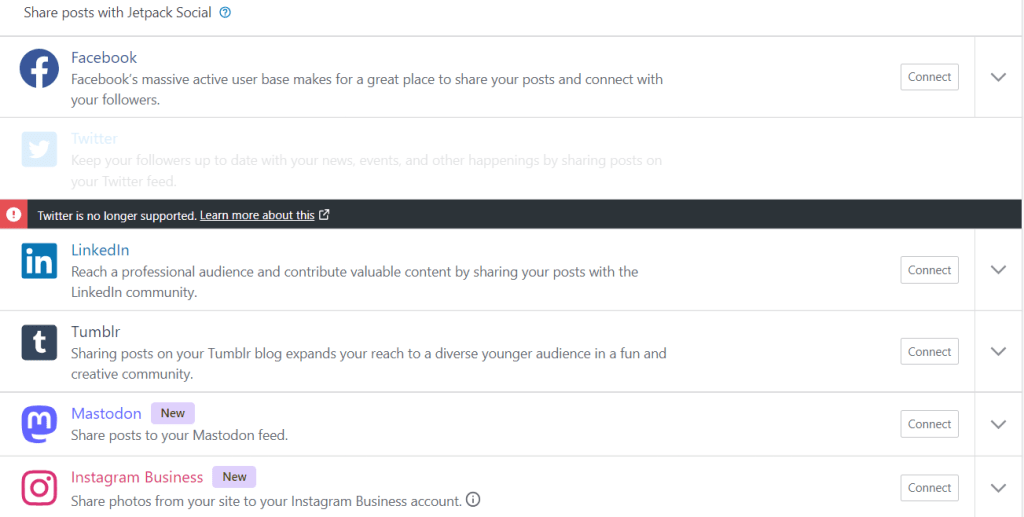
Twitter is no longer supported
Twitter changed its publishing and pricing usage, so it is unable to share posts automatically on Twitter (X). To learn more about click here.
How to auto-publish with Jetpack Social
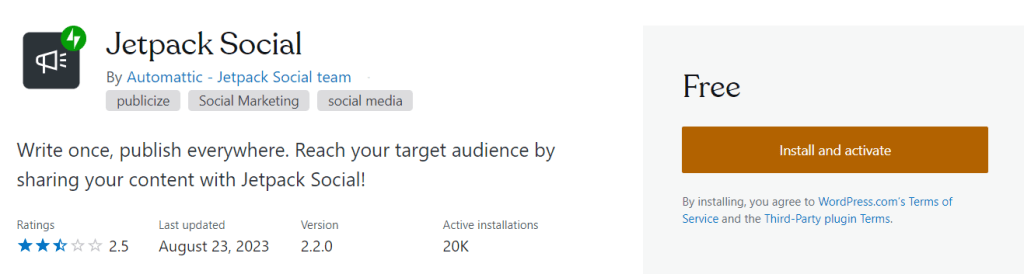
- Install Jetpack Social Plugin.
- Go to the the plugin library and search Jetpack.
- Connect Your Social Media Account.
- Visit your site’s dashboard.
- In the left side options, navigate to Tools → Marketing.
- Click on the Connections tab to find a list of available services to connect to.
- Next to your chosen social media platform, click the Connect button and follow the prompts to connect to a service. Detailed instructions for each social network are listed further down in this guide.
Conclusion
Auto-publishing your blog on social media not only saves you valuable time but also ensures that your content is instantly shared across all your social media channels. With the powerful Jetpack Social plugin, this process becomes a breeze, as it seamlessly integrates with major social platforms and can be easily connected.
Think of Jetpack for WordPress as your very own personal assistant, equipped with advanced social media management tools. It empowers you to effortlessly schedule and publish your content, giving you complete control over when and how your blog reaches your eager audience.
Say goodbye to the hassle of manually sharing your posts and let Jetpack handle it all for you. With this indispensable tool at your fingertips, you can focus on what you do best – creating amazing content that resonates with your followers.

 Dropner Graphic Explainer
Am thinking of trying this plugin, what is the minimum plan tier to use it on WordPress? Please advise. Thanks!
LikeLike
If you host your website on WordPress.com then this plugin is managed by WordPress.com. If you have self-hosted site [blue host, hostgator etc.] Visit WordPress.org.
<
blockquote>
<
blockquote>
LikeLike
Thank you! I have the basic plan through WP and will try it!
LikeLike
Have been using Jetpack for 3 years now. Its still one of my favourite plugins!
LikeLike
👉I agree 👈. My site uses the plugin for 4 years it makes the site multifunctional with good sharing options. Recommended it!!!
LikeLike
Great post ✍️
LikeLike
Thank you.
LikeLike
Welcome 🙏 freinds
LikeLike