
Introduction: Secrets to Crafting Captivating Content In WordPress
The secrets to Crafting captivating content in WordPress involve several key elements.
Firstly, it’s crucial to understand the target audience and tailor the content to meet their needs and interests.
Additionally, compelling visuals and multimedia can enhance the content’s appeal. Utilizing engaging titles and introductions, as well as structuring the content with clear headings and subheadings, can also captivate the audience.
Lastly, incorporating storytelling and emotional appeal can further elevate the impact of the content.
So, let’s talk about making the most of the Gutenberg editor in WordPress. We’ll cover cool tips, tricks, and best practices for using all the awesome features of the Gutenberg editor to create killer content that really pops.
The reason it’s important to create interesting and exciting content is to pull in, keep, and make a connection with the people who read your articles.
The 10 secrets are:
- The use of quality imagery.
- Call-to-action buttons.
- Separators.
- Embedding videos.
- Using slideshows.
- Installing the right plugin.
- Designing eye-catching blog banners.
- Spacers.
- Headings and paragraph.
- List.
Those 10 will be discussed in this blog post.
Overview
- In this article, you get 10 Secrets to Crafting Captivating Content In WordPress.
- Additionally, you get an idea of what you can do.
Table of Contents
- Introduction: Secrets to Crafting Captivating Content In WordPress
- Utilizing Images to Enhance Content
- Enhancing Readability with Separators
- Engage Readers with Videos and Slideshows
- Call-to-action buttons for Increased Interaction
- Embedding Content from External Sources
- Enhancing Functionality with Plugins
- Designing an Eye-Catching Blog Banner
- Conclusion
Utilizing Images to Enhance Content
Using high-quality, relevant images in blog posts is absolutely crucial. Images not only break up textual content and improve comprehension but also boost social media sharing. Moreover, they play a significant role in establishing the blog as professional and trustworthy, potentially drawing in a larger audience. Additionally, good images can improve the blog’s visibility on search engines and elevate the overall reading experience for visitors.
The Impact of Visually Appealing Content on Reader Engagement
Visually appealing content has a significant impact on reader engagement. When content is visually attractive, it can capture the reader’s attention more effectively. This can lead to increased interest and prolonged engagement with the material.
Additionally, visually appealing content tends to be more memorable for readers, enhancing the overall impact of the message being conveyed. As a result, integrating visually appealing elements into content can greatly enhance its effectiveness in connecting with the audience.
Here are some tips for finding and improving images for WordPress:
| 1. | Use high-quality images to enhance your website’s appearance. |
| 2. | Optimize images by compressing them to reduce file size without losing quality. |
| 3. | Consider using stock photo websites for a wide selection of professional images. |
| 4. | Ensure the images you use are relevant to your content to engage your audience effectively. |
| 5. | Use descriptive file names and alternative text (alt text) to optimize images for search engines and accessibility. |
My blog has tons of pictures. The plugin I love shrinks the image sizes on my blog is Imagify.
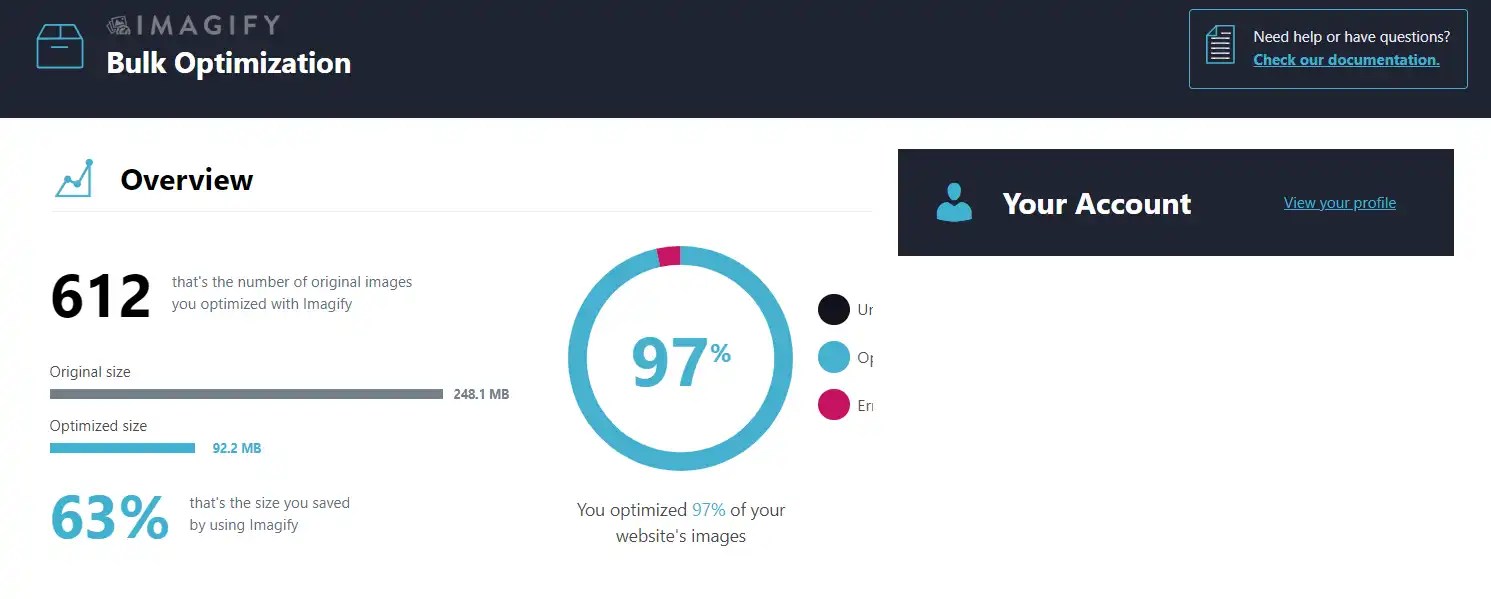
Besides using plugins there are plenty of free online compression tools that reduce the file size and speed up the loading.
Free online compression tools
If your website’s images are loading slowly, you might need to reconsider your image optimization strategy. Using free online compression tools can reduce the image size and speed up the website loading time.
Popularly used tools are:
- TinyPNG
- ShortPixel
- Get your website to the next level with an amazing compression tool from Websiteplanet. Simply follow the steps below and let’s boost your website’s performance together!
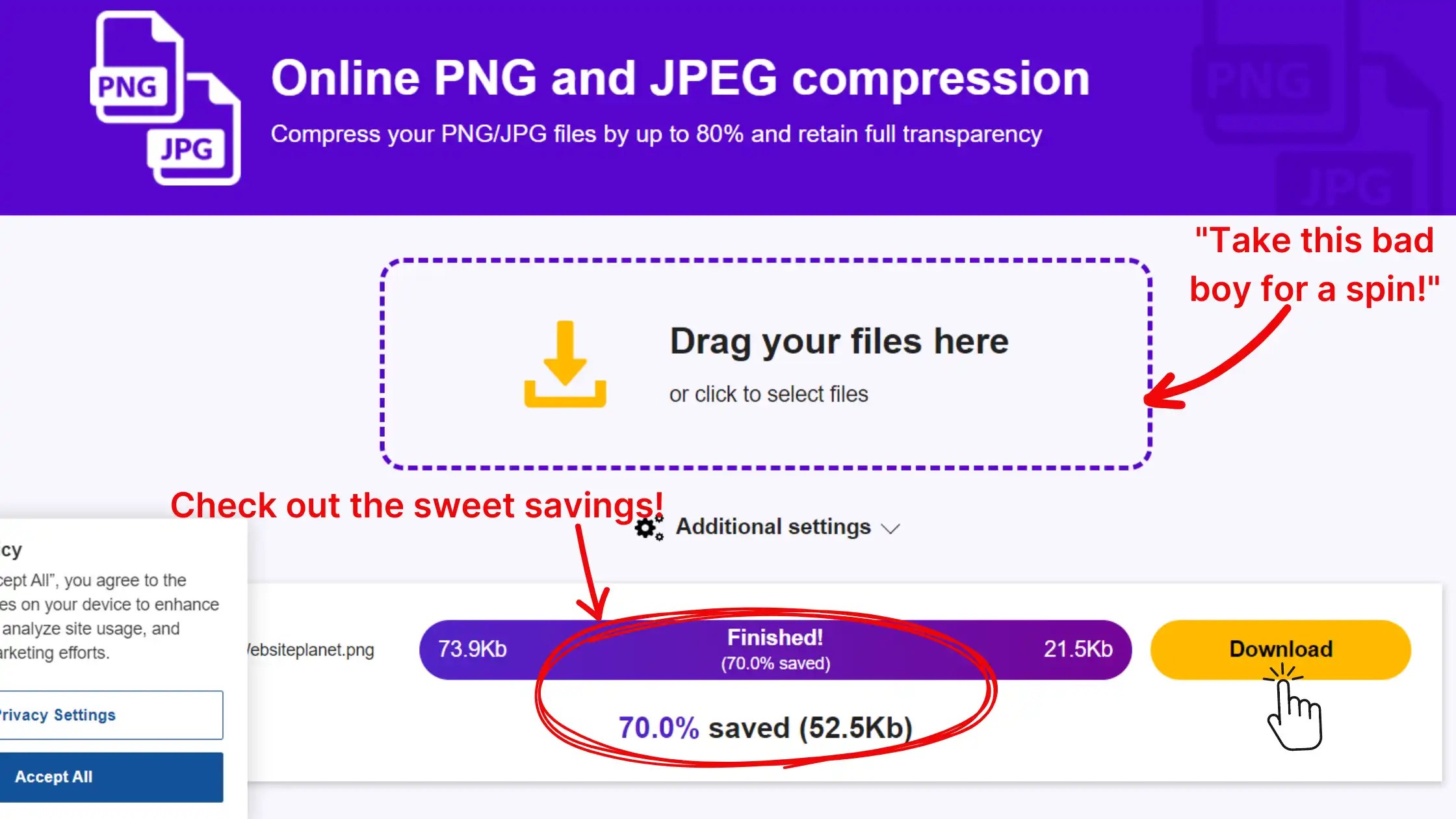
Using free online compression tools to increase loading speed is important for crafting captivating content in WordPress.
Enhancing Readability with Separators
Separators play a key role in breaking up content, making it easier to read. They help to create visual breaks between different sections, making the content more organized and visually appealing. This can help readers to navigate the content more easily and understand the structure of the information. Overall, separators contribute to a better reading experience.
In WordPress, there are different types of separators that you can use to divide content effectively. These separators help to organize and structure your website’s content. You can use separators such as [default] horizontal lines, dots, or wide lines to create visual breaks between different sections of your content. By using separators effectively, you can improve the readability and navigation of your website.
Incorporating separators into blog posts is an essential aspect of structuring and presenting content. Here are some strategies for effectively implementing separators:
| 1. | Horizontal lines: Use horizontal lines to create clear distinctions between different segments of the blog post. This practice facilitates seamless navigation and comprehension for the readers. |
| 2. | Strategic use of whitespace: Deliberately incorporate whitespace to demarcate paragraphs and sections, enhancing the overall readability and visual organization of the content. |
| 3. | Visual elements: Integrate relevant images, illustrations, or infographics to act as delineating elements between disparate parts of the post, imparting a heightened visual appeal and segmental clarity. |
| 4. | Utilization of subheadings: Employ descriptive and structured subheadings to partition various components of the blog post, ensuring logical progression and aiding readers in absorbing the information more effectively. |
| 5. | Emphasis through blockquotes: Employ blockquotes to emphasize noteworthy excerpts, statements, or citations within the narrative. This method accentuates pivotal content while concurrently serving as a distinct separator. |
By carefully using these methods, writers can make their blog posts more cohesive and engaging for readers, leading to a better and more organized reading experience. I personally find the wide line separator helpful for dividing sections.
Engage Readers with Videos and Slideshows
So you want to make your text stand out to interest your readers, but you’re not sure how to begin.
According to different case studies, using videos and slideshows is beneficial for SEO. You can use this to create engaging content in WordPress.
Here are the video options you can try.
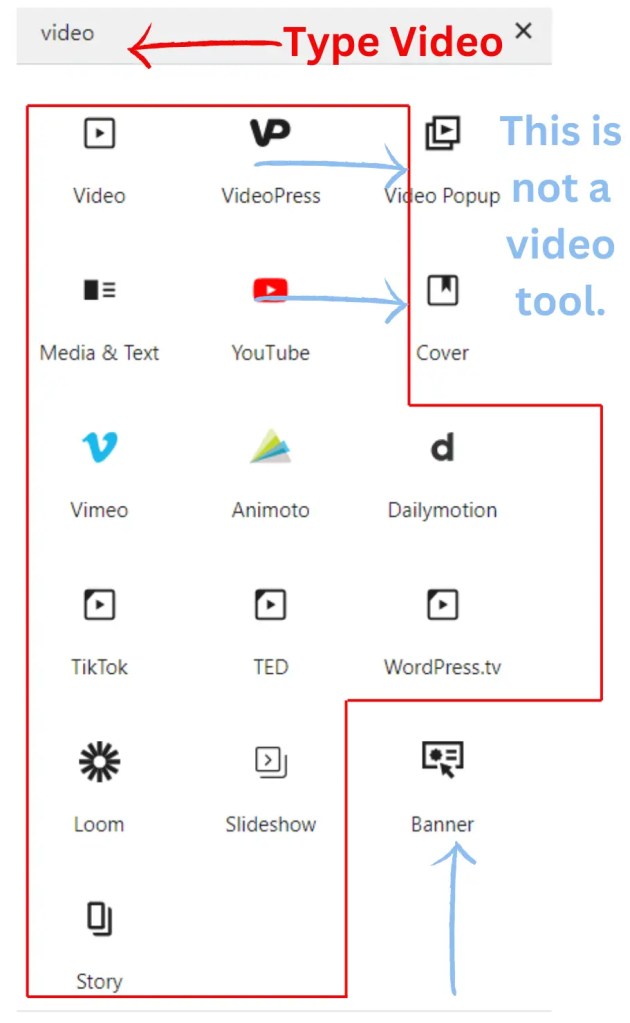
Multimedia content like videos, images, and audio can make the user experience better. It can help to explain things more clearly, make the content more engaging, and appeal to different types of learners.
To embed videos in WordPress, you can simply paste the video URL into the editor, and WordPress will automatically embed the video for you. If you want to create an interactive slideshow, you can use the built-in gallery feature or a dedicated plugin. With the gallery feature, you can upload multiple images and arrange them into a slideshow.
For a more interactive experience, consider using a plugin like “Slider Revolution” or “MetaSlider” to create customized slideshows with various effects and transitions.
Call-to-action buttons for Increased Interaction
Call-to-action buttons are important because they show your readers what you want them to do. They make it really easy for people to understand what to do next, like signing up for a newsletter, making a purchase, or exploring more content. Without these buttons, readers might not know what to do and could miss out on great opportunities.
Types of Buttons in WordPress and How to Use Them
WordPress offers various types of buttons that you can use to add interactive elements to your website. These are some common types of buttons with their usage:
| Type | Description |
|---|---|
| Text Buttons | Simple buttons with text on them, often used for call-to-action purposes like “Read more” or “Sign up”. |
| Image Buttons | These buttons use images instead of text, making them visually appealing and effective for engaging visitors. |
| CTA Buttons | Call-to-action buttons are designed to prompt an immediate response from the user, such as “Buy now” or “Subscribe”. |
| Social Media Buttons | These buttons are linked to your social media profiles or pages and are used to encourage visitors to connect with you on various platforms. |
| Plugin Buttons | Some WordPress plugins provide specialized buttons, like “Add to Cart” buttons for e-commerce or “Share” buttons for social media sharing. |
Understanding the different types of buttons available in WordPress can help you enhance the user experience on your website and achieve your desired goals.
Tips for Designing Compelling Buttons and Placing Them Strategically Within Blog Posts
When creating buttons for your blog posts, choose contrasting colors to make them noticeable. Use brief and clear text on the buttons to prompt action. Position the buttons strategically in your content, like at the end of a section or after a call to action. Ensure that the buttons are easy to find and visible to your readers.
Here are the steps for creating buttons:
Here’s a visual guide showing the best spots to put buttons in your blog post.

Embedding Content from External Sources
Advantages of Embedding Content from External Sources
When you embed content from external sources like social media posts or interactive maps on your website, you can enrich your site with dynamic and interactive elements. This helps to keep your visitors engaged and provides them with diverse and interesting content. Additionally, embedding external content can enhance the visual appeal of your website and make it more informative and entertaining for your audience.
To embed content seamlessly into your WordPress posts, you can use the built-in Gutenberg blocks for various types of media, such as images, videos, and audio. Additionally, you can directly paste the URL of the content you want to embed, and WordPress will automatically convert it into an embedded format. If you require more advanced embedding options, you can utilize custom HTML code or plugins designed for specific content types.
Enhancing Functionality with Plugins
Plugins play a pivotal role in extending the functionality of WordPress by facilitating diverse functionalities and customizations. They enable users to augment their websites without necessitating extensive coding knowledge, allowing for the seamless addition of new features, performance optimization, enhanced security, and tailored adjustments.
Furthermore, plugins facilitate seamless integration with third-party services, thereby enhancing WordPress’s adaptability to various requirements. In essence, plugins empower WordPress users to craft distinctive and powerful websites.
Recommendations for Selecting and Installing Plugins
When selecting plugins, it’s crucial to assess their impact on your website. CoBlocks and Getwid are both suggested plugins that provide interactive features for engaging with your audience. They offer a user-friendly approach to creating compelling content. It’s essential to install plugins that align with your website’s goals and improve the overall user experience.
Designing an Eye-Catching Blog Banner
For each blog post, I make a banner to show what the post is about. I use Canva to do this.
You can pick a template and customize it, or start with a blank one. If you’re new to Canva, check out this tutorial to get an idea.
The Importance of a Visually Appealing Blog Banner
A visually appealing blog banner is crucial for attracting readers. It’s the first thing visitors see when they land on your blog, so it needs to make a strong impression. A captivating banner can grab the attention of potential readers and entice them to explore your content further. It sets the tone for your blog and can help create a memorable and engaging experience for your audience.
When designing a blog banner, consider the following elements:
- Purpose: Think about the message or feeling you want to convey.
- Visuals: Choose images and graphics that relate to your blog’s theme and appeal to your audience.
- Typography: Select readable fonts that complement your blog’s style and are easy on the eyes.
- Branding: Incorporate your logo and brand colors to maintain consistency with your overall brand.
- Clarity: Ensure that the banner clearly communicates the purpose of your blog and what visitors can expect.
- Responsiveness: Make sure the banner looks good on different devices, such as mobile phones and tablets.
By considering these elements, you can create an engaging and effective blog banner.
Conclusion
In conclusion, crafting captivating content in WordPress is a mix of free online compression tools and other Gutenberg editor tools.
The 10 secrets to crafting captivating content in WordPress are:
| No. | Content |
|---|---|
| 1. | The use of quality imagery |
| 2. | Call-to-action buttons |
| 3. | Separators |
| 4. | Embedding videos |
| 5. | Using slideshows |
| 6. | Installing the right plugin |
| 7. | Designing eye-catching blog banners |
| 8. | Spacers |
| 9. | Headings and paragraph |
| 10. | List |
To make your content interesting and captivating, it’s important to use these strategies. Highlighting their importance can help you create engaging material.
Start using the techniques outlined to improve your WordPress blog posts and reach a larger audience. Begin with an easy one.
If you have any questions about my WordPress design service, feel free to contact me.

 Dropner Graphic Explainer