
Are you struggling to increase the visibility of your WordPress blog on search engines? Despite your best efforts, your blog may not be ranking as high as you would like due to common SEO mistakes to avoid. “I had the same SEO struggles by the way”.
Search engine optimization (SEO) is crucial for driving organic traffic to your website. With WordPress being one of the most popular content management systems, optimizing your blog for search engines to attract more visitors is important.
If you want to improve the SEO performance of your WordPress blog, it’s essential to avoid certain mistakes that could be holding you back.
From neglecting keyword research to ignoring meta tags, these common errors can hinder your blog’s search engine rankings. To ensure your blog is reaching its full potential, it’s important to be aware of these mistakes and take steps to correct them.
Overview
- In this article, you get common SEO Mistakes to Avoid.
- Also, we show you which settings can help your WordPress SEO.
- Furthermore, we show you how to track performance.
Table of Contents
- SEO mistakes to avoid #1. Ignoring Image Optimization
- SEO mistakes to avoid #2. Not Optimizing Meta Tag
- SEO mistakes to avoid #3. Ignoring Image Optimization
- SEO mistakes to avoid #4. Neglecting Mobile Responsiveness
- SEO mistakes to avoid #5. Overlooking Internal & External Linking
- WordPress SEO Settings to Boost Your SEO
- Brand Your Blog With A Logo, Favicon, And Track It
- Conclusion
SEO mistakes to avoid #1. Ignoring Image Optimization

The first thing you must include is to write an alt text for your images. The reason is you make the images in your article relate to visually handicapped people and be discernible for Google Images.
You have to learn to write alt text. You can write good or lacking alt text. You can write poor alt text and not know it.
❌ Poor alt text is a too vague example: a baseballer hitting a ball.

✅ An example of a good alt text is descriptive: Mookie Betts has led the Dodgers to the best record in baseball through the first 30 games of a 60-game season.
❌ Also, use descriptive filenames: what not to do → pexels-photo-691710.
How to write a good filename?
Describe the intention or goal, and the target group you want to reach.
✅ So, use → Common SEO mistakes for WordPress bloggers.
The relatable blog post you might want to read: Are you missing these SEO elements?
SEO mistakes to avoid #2. Not Optimizing Meta Tag
Meta tags also called Meta Description and HTML tags are used to provide additional information about a web post or page. It tells Google what the page is about and if it matches the content as described in the snippet.
Meta tags or descriptions should look like this.
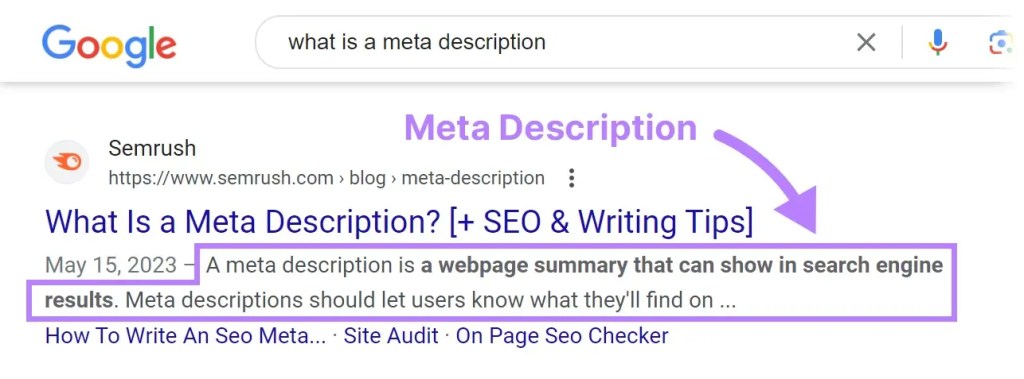
A well-written Meta Description can help to generate search clicks, here are tips to write one.
- Keep your sentence around 120 to 140.
- Meta must match search intent.
- Improve the quality of the content.
- Avoid keyword stuffing.
- Get an SEO plugin for WordPress such as RankMath SEO → Get RankMath SEO.
You can write one in WordPress in the Excerpt box.
The title and permalink [The URL] should be:
- Descriptive.
- Accurate.
- Concise.
- Cohesive.
SEO mistakes to avoid #3. Ignoring Image Optimization
Image SEO plays an important role in how quickly the images will load after each visit. It may be that your blog is not running smoothly due to the heavy loading of your files. Therefore, opt for an image compressor that maintains the quality and reduces your image files.
Some of the best image compressors are:
On this blog, I use the Imagify plugin, which helps to convert my images to WEBP format. The benefits of using the WEBP format are:

I love using tons of images, and I really want my site to load super fast. Optimizing those images is crucial for boosting the speed score.
Look at how 85% of the images are optimized, even the ones in this article! Can you believe how fast they load?
Thanks a million, Imagify!
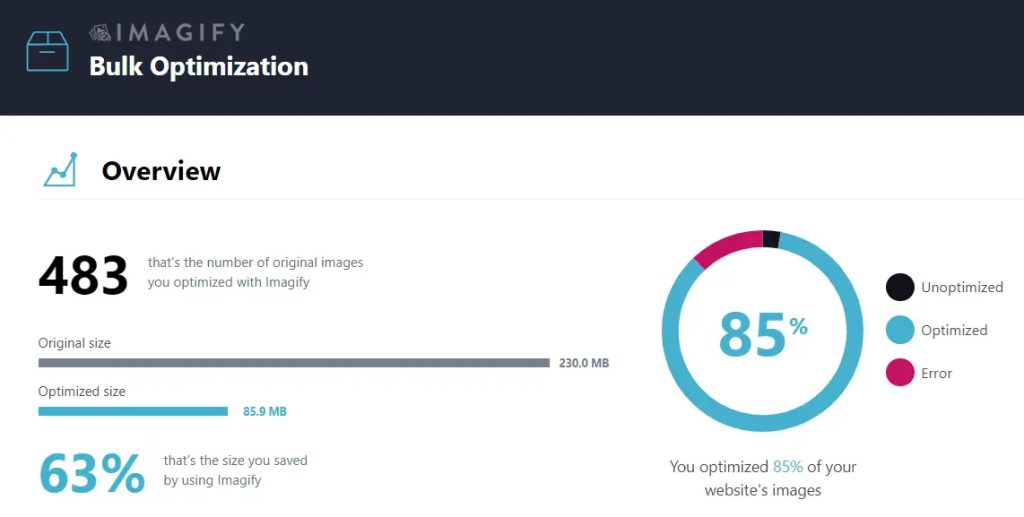
WebP images can load faster, saving both bandwidth and loading time for your website visitors. For instance, according to Google’s developers, lossless WebP images can be up to 26% smaller than comparable PNG files, and WebP lossy images are 25-34% smaller than comparable JPEG images.
Source: TinyPNG Blog
Do you want to know more about image compressors?
Read this blog → 10 Best Optimize Images Compressors For WordPress
SEO mistakes to avoid #4. Neglecting Mobile Responsiveness
You’ve got to make sure your website is mobile-friendly for SEO to work in your favor. More and more people are browsing the web on their phones, and search engines definitely take this into account when ranking sites. So, having a mobile-friendly site is key to boosting your search engine visibility and driving more organic traffic. The Do’s And Don’ts Of Mobile Blogging
Plus, it also improves the overall user experience, leading to lower bounce rates and longer visits, which are super important for SEO. In a nutshell, optimizing your website for mobile is a must for SEO success.
WordPress themes can vary in terms of mobile readiness. However, many modern WordPress themes are designed to be mobile-friendly or responsive, meaning they adapt and display well on various devices, including smartphones and tablets.
When selecting a WordPress theme, it’s essential to prioritize mobile responsiveness to ensure a positive user experience across different screen sizes.
Additionally, using mobile-friendly themes can contribute to better SEO performance, as search engines prioritize mobile-friendly websites in search results.
- Firstly, prioritize selecting a mobile-friendly or responsive WordPress theme to ensure that your website adapts and displays well on various devices, including smartphones and tablets. This can significantly enhance the overall user experience and positively impact SEO performance.
- Additionally, consider optimizing the website’s layout and design to ensure that it functions seamlessly across different screen sizes. Elements such as font sizes, navigation menus, and images should adjust appropriately to varying device dimensions.
- Test your WordPress blog’s mobile responsiveness using different devices and browsers to identify any potential issues. Addressing any display or functionality discrepancies will help provide a consistent and user-friendly experience across all platforms.
- Utilize plugins and tools specifically designed to enhance mobile responsiveness and performance. These resources can assist in optimizing images, improving page load times, and ensuring that the website functions efficiently on mobile devices.
By implementing these suggestions, you can effectively make your WordPress blog mobile-responsive, ultimately improving its search engine visibility and user engagement.
SEO mistakes to avoid #5. Overlooking Internal & External Linking
Internal linking for SEO
Internal linking for SEO can make a real difference. It helps search engines grasp the structure of your website, enhances the user experience by guiding visitors to relevant content, and ensures that your site gains visibility and improved search rankings.
External linking for SEO
External linking, also known as backlinking, can have a positive effect on your website’s search engine optimization (SEO).
When other reputable websites link to your site, it signals to search engines that your content is valuable and trustworthy.
This can lead to an increase in your website’s ranking on search engine results pages, making it more likely for people to find and visit your site.
Tips for Improving Internal and External Links in Blog Posts
So, you wanna know how to nail internal and external linking in your blog posts? Well, here are some killer tips to help you out:
Internal Linking:
- Keep it relevant: Link to other articles or pages on your own website that are related to the topic at hand. This keeps your readers engaged and encourages them to explore more of your awesome content.
- Natural placement: Don’t force it! Make sure your internal links fit seamlessly into your content, so they feel organic and helpful to your readers.
External Linking:
- Quality over quantity: Link to reputable and relevant sources that provide additional value to your readers. It’s not a race to see how many links you can add!
- Open in a new tab: When linking to external sites, consider having the links open in a new tab. This keeps your readers on your page while allowing them to check out the linked content.
By acing your internal and external linking, you’ll boost your blog’s SEO and provide a richer experience for your readers.
Go on, give it a whirl!
WordPress SEO Settings to Boost Your SEO
When it comes to improving your SEO on WordPress, there are a few key settings you can focus on to enhance your website’s visibility to search engines.
By paying attention to these settings, you can increase the likelihood of your content ranking higher in search results.
Permalink
Change the permalink to post name, if you have a live site it is not recommended to change it.

❌ Don’t use this.
This is not a logical structure, and no one wants to link to
https://sitename.com/page id=123.✅ Use this.
This is a more logical structure that is easy to understand, and it looks cool
https://atomic-temporary-137870880.wpcomstaging.com/SEO-Mistakes
XML Sitemaps
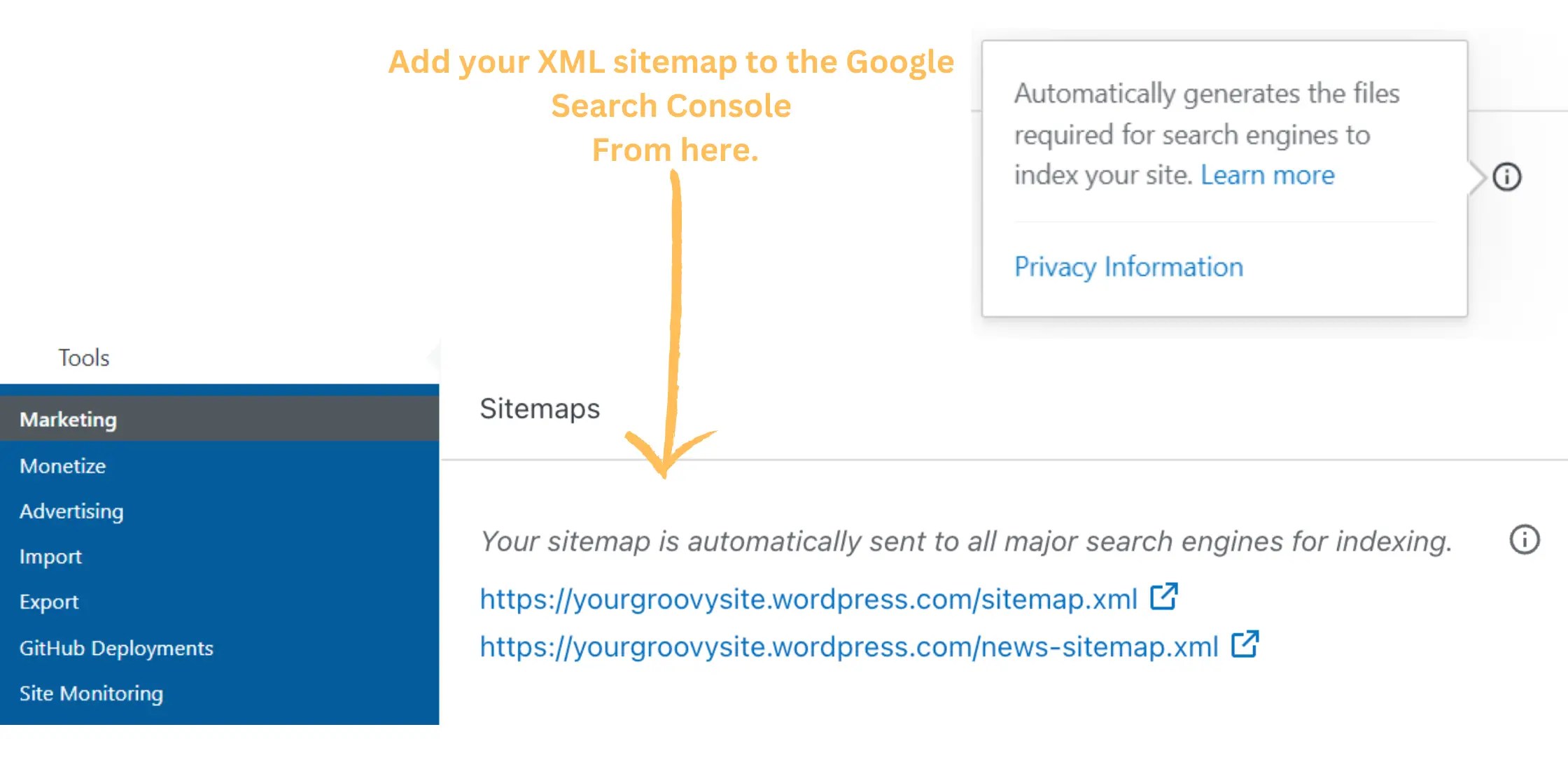
Incorporating an XML sitemap into your SEO strategy is absolutely essential for success. This sitemap serves as a vital navigational aid for your website, guiding users and search engines toward your content.
Adding these XML sitemaps to Google Search Console confidently ensures proper indexing and sets the stage for increased visibility and traffic to your site. Embrace this opportunity with enthusiasm and watch your site reach new heights!
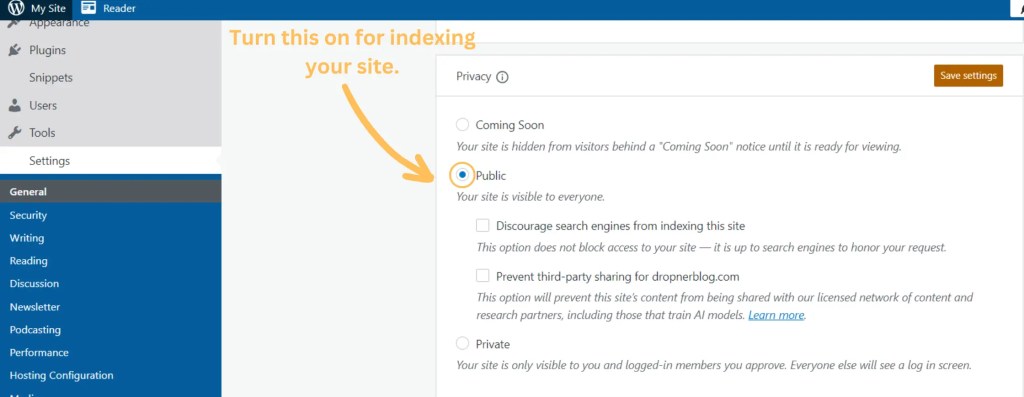
Turn the public settings on, so your site is available for indexing.
Enabling public settings allows your website to be accessible and indexed by search engines. This is an important step in increasing the visibility of your site and attracting more visitors.
By making your site available for indexing, you ensure that it can be discovered through organic search results. This can ultimately lead to more traffic and potential engagement with your content.
Additionally, being indexed by search engines is crucial for expanding the reach of your website and reaching a wider audience. Therefore, it’s highly beneficial to activate the public settings and maximize the potential of your online presence.
Brand Your Blog With A Logo, Favicon, And Track It

Not having a distinct logo can limit your brand’s credit in the online world. With countless brands, you have in your niche [market], it is hard to stand out without a good logo.
Logos do not have a direct impact on SEO, but they serve for recognition, differentiation, and bookmarking.
Your logo must reflect your blog business: in other words, the logo must summarize and communicate your blog’s meaning and what the public can expect from your blog.
The perfect size is 410 px x 110 px, start creating one using Canva. Here are the steps to create it.
Creating a WordPress logo.
- Step 1: Get this size 410 px x 110px.
- Step 2: Look for an element and text that reflects your content.
- Step 3: Group the image and scale it.
- Step 4: Move the grouped logo to the left.
- Step 5: Download the logo as a PNG file without a background.
To summarize steps 1 to 5 check out my video.
An alternative way to remove background for free is remover. bg.
Step 6: Upload your logo.
Go to your dashboard → Go to Appearance → Customize → Site Identity.
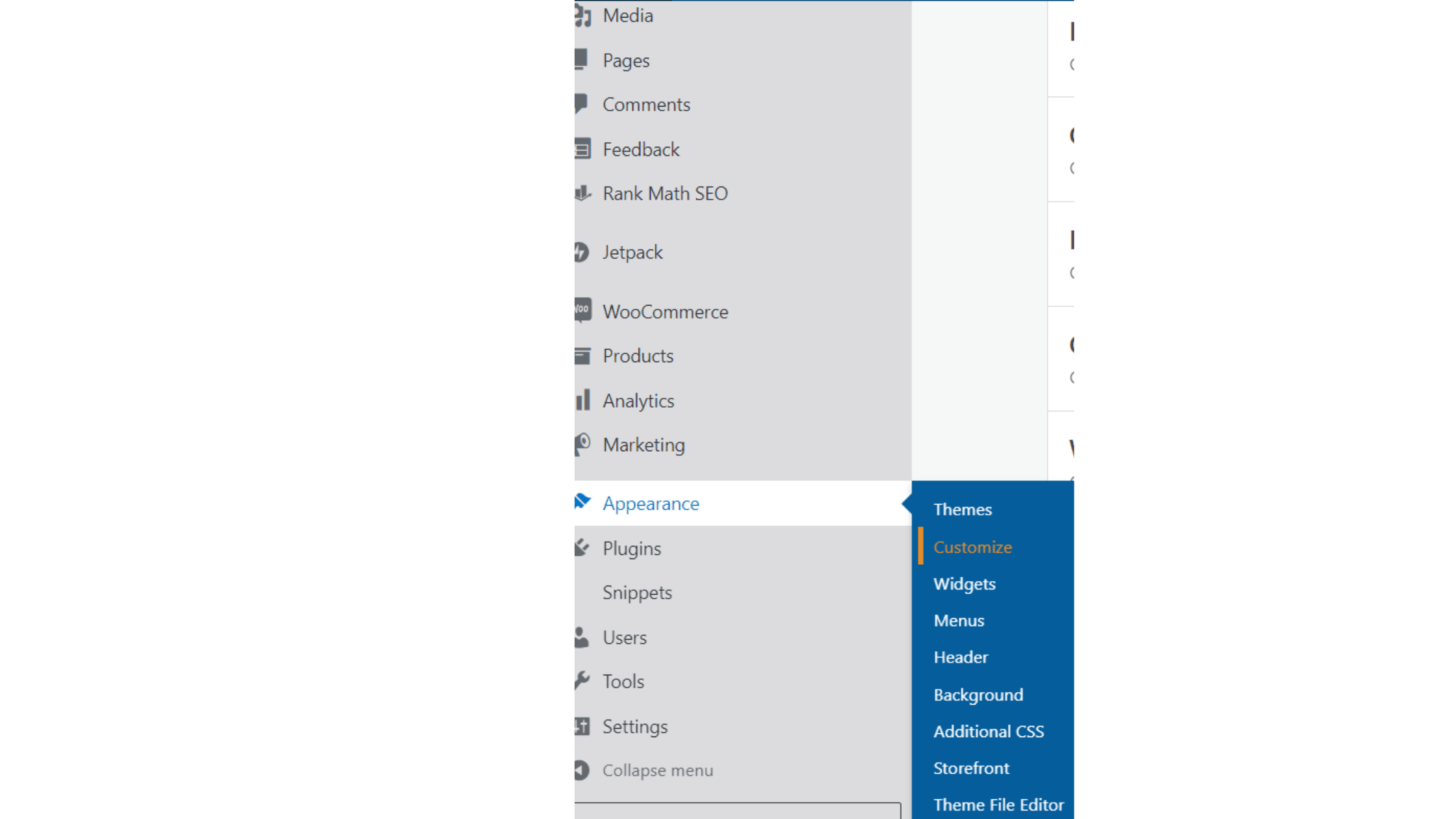

Creating a WordPress favicon.
A favicon or a logo does not directly impact the SEO, but it is a crucial branding factor on the web.
It serves as a visual representation of a website or a brand, making it instantly recognizable to visitors.
A well-designed favicon or logo can contribute to a cohesive and professional online presence, leaving a lasting impression on users.
Additionally, when shared on social media or other platforms, a distinctive logo can enhance brand recognition and visibility.
Therefore, while not a direct factor in SEO, the presence of a high-quality favicon or logo can indirectly influence user engagement and brand credibility. The size is 16 px x 16 px.

Track your blog growth
Blog growth can be tracked using the internal WordPress stats. If you use these tips in your blogging game plan, you’ll gain more followers. I used it to help me gain more blog followers in 4 years.
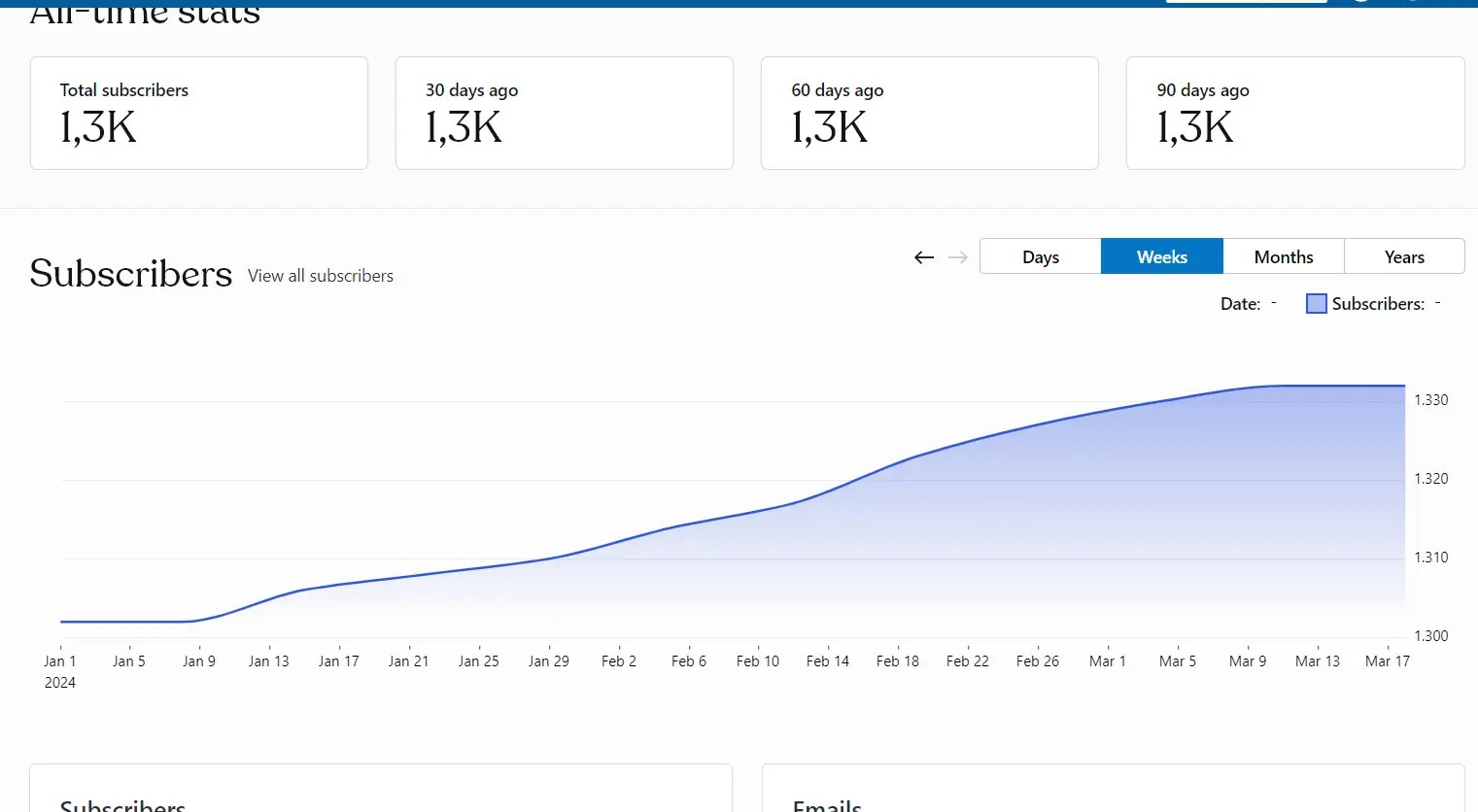
Hey, just be patient because SEO results don’t show up overnight. It can take years to really see the positive impact of SEO.
Conclusion
In conclusion, WordPress SEO mistakes can be easily dodged by sticking to the tips in this article. SEO needs patience and a willingness to learn, so take it slow and don’t rush through it.
To summarize the key points:
- Do not ignore image optimization.
- Do not ignore meta tags.
- Get an SEO plugin.
- Mobile.
- Add your sitemap.
- Links external and internal.
- Style your brand such as a logo.

 Dropner Graphic Explainer