
Written By Bonny Isselt.
Introduction to: Creative Blog Post Design Essentials: How to Make Your Posts Stand Out
Blog post design essentials are a set of design principles that engage, relate to the reader, and stand out more than the competitors. Its importance is a simple one: to impact the reader and keep the reader.
Many free and paid online tools allow you to create an awesome blog post design. But you don’t have to use every plugin or buy expensive software to design content.
Relax as we guide you to make your post stand out with blog post design essentials.
Summary
- In this blog post, you get an idea of what blog post design essentials are.
- Furthermore, you get the best tips you can include in your design.
- As a last how to use images strategically to break up text.
What are Blog Post Design Essentials?
Blog post design essentials are how you lay out fonts, work with the right color scheme, and create overall visual appeal.
This must all be synced with your content. Additional imagery should be placed throughout the content.
It is important to have cohesive and visually appealing designs to capture and maintain audience interest.
Site Fonts
The best font that performs well on a site is System Font. In this video, you get a simple way to change it to match your writing.
Tip: Use System fonts for better readability.
Site fonts that do not perform well on a site are italics and bold fonts. You can mislead the reader; the font does not align with the brand, and it is harder to read the text.
For instance, this seems correct.

Tips for when to use complementary fonts and maintaining consistency across all posts.
Do
- Bold fonts for headings are ok.
- Bold fonts to highlight text.
- Italics in captions are ok.
- Short text in bold joint with italics, is okay. (1-2 words).
Do not
- Use bold text for all your writing.
- Use italics for all your writing.
Tips for image placement
Placing images on your site must include key points that you must include in every published blog post, which are mentioned below.
Practical tips:
- High-quality and relevant images in blog post design.
- Including their role in breaking up text
- Enhancing visual appeal.
- Delivering the messages.
The best sources are not using stock images but creating images that sync with your site content.
Tip 1. Content must match the image
For example, if you write about BBQ, your images must center around BBQ.

Tip 2. Give credits
When you design, place your logo on it. Credit your graphic design work like this.

Tip 3. Use (stock) images legally and ethically
You must credit the photographer with stock photos and not edit the image. That is how to use them legally and ethically.
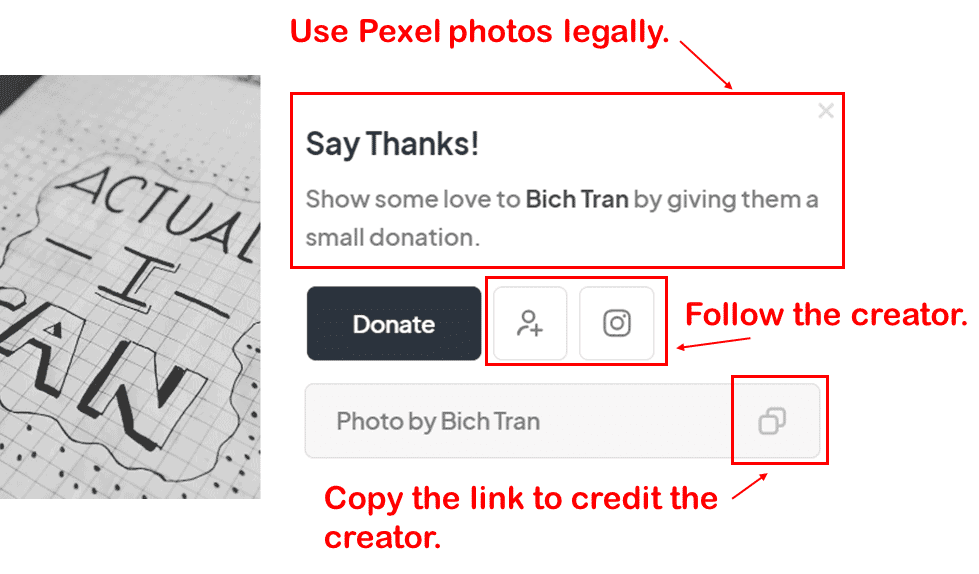
Below are popular ways to create images and videos for your blog post.
- A popular method for graphics is Canva.
- A popular method for videos is Invideo and Clipchamp. (Clipchamp is only for PC).
Create a logo
Creating a logo is an essential part of branding a site. Your logo is like your blog’s signature. Make sure it matches your blog’s style, so visitors know what to expect when they drop by.
To create a logo, some designers use CorelDRAW Graphic Suite. To get logos done with their easy-to-use navigation and beginner-friendly learning curve.
Use simple navigation
Some navigation elements located within the header pose challenges in terms of discoverability.
From both a user experience (UX) and user interface (UI) standpoint, it is helpful to ensure ease of access for the audience.
The rationale is straightforward: this approach facilitates smoother navigation towards the relevant content.
Include social media sharing
In WordPress, you can share content on social media and attract new readers. Especially if your goal is to make money, you should first create high-quality content that can be shared.
Incorporating White Space
This is one of the most important elements in blog post design essentials. Using empty space: the effect you create is to give the reader some breathing room. It looks messy if you use too many images and text. Give the reader and buyer space.
Show related post
To refer the reader to another blog post, it is useful to apply a ‘show related content’ feature in your blog. The goal is to increase the reader’s interest as they scan your blog post. This will likely also garner attention for that blog post.
Conclusion
To summarize the main points discussed in this blog post, you need to know what you can do to make your blog content stand out.
Blog post design essentials are ways to make the content attractive and relevant to the reader.
I recommend you apply these tips for a higher visual impact and to leave a lasting impression on readers.
Do you think these tips are useful? Drop a comment and give it a like or share. Thanks!


Excellent piece! Your thorough summary is much appreciated. I now see the issue from a different angle thanks to your insightful comments. You made your points quite clearly with the examples you included. You have my gratitude for penning this.
Thanks!