
Introduction to Essential WordPress SEO Tips
Are you a WordPress blogger looking to improve your search engine optimization (SEO) and increase your website traffic? The digital landscape is ever-evolving. It’s essential to stay updated on the latest SEO strategies. This ensures your blog ranks high on search engines like Google.
With millions of websites competing for attention online, having a solid SEO strategy is crucial. It is essential for standing out from the crowd. WordPress is a popular platform for bloggers. It has a user-friendly interface. It also offers countless plugins that can help improve your site for search engines. Yet, knowing how to effectively use these tools is key to maximizing your blog’s visibility.
This article will discuss 10 essential WordPress SEO tips for WordPress bloggers specifically. By implementing these strategies, you can improve your blog’s search rankings. You can attract more organic traffic. Ultimately, you will grow your online presence.
Overview
- This article contains a basic guide for WordPress SEO bloggers.
- Including the best WordPress SEO plugins.
- Give answers to frequent essential WordPress SEO tips/problems in our FAQ section.
Table of Contents
- Introduction to Essential WordPress SEO Tips
- Understanding WordPress SEO
- 10 Essential WordPress SEO Tips for WordPress Bloggers
- SEO Strategy
- 10 Proven Tips to Identify Relevant Keywords for Your Blog Posts
- Keyword Research Tools and Plugins for Finding High-Ranking Keywords with Low Competition
- Optimizing On-Page Elements
- Quality content matters
- How to optimize these elements using relevant keywords.
- Creating High-Quality Content
- Building Quality Backlinks
- Importance of Guest Blogging, Social Media Promotion, and Networking with Other Bloggers
- Conclusion
- FAQ
Understanding WordPress SEO
WordPress SEO focuses on utilizing the powerful features of the WordPress platform. This helps improve a website’s visibility. It also improves ranking on search engine results pages. This involves optimizing the website’s structure. It includes using SEO-friendly themes and plugins. It also involves creating high-quality content, improving site speed, and ensuring seamless mobile responsiveness.
On the other hand, general SEO practices cover a broader range of optimization techniques. These techniques can be applied to any website, regardless of the platform it is built on. These strategies include keyword research, on-page optimization, link building, and technical SEO.
The main difference lies in how these techniques are specifically implemented within the WordPress ecosystem. They take advantage of its unique capabilities and functionalities to enhance a website’s performance in search engine rankings.
Top 10 WordPress SEO Plugins
WordPress has a bunch of cool features and plugins that are perfect for boosting your blog’s search engine optimization. You’ve got awesome WordPress SEO plugins like Yoast SEO, All in One SEO Pack, and Rank Math SEO. These plugins make it super easy to handle meta tags, sitemaps, and optimization advice.
1. Yoast SEO
Yoast SEO is a popular and comprehensive SEO plugin for WordPress. It offers features such as content analysis, XML sitemaps, and social media integration.
2. All-in-One SEO
All-in-One SEO Pack is a user-friendly plugin with features like XML sitemap support, Google AMP support, and advanced canonical URLs.
3. Rank Math
Rank Math is known for its powerful schema support, easy setup, and advanced SEO analytics features for WordPress websites.
4. SEOPress
SEOPress is a feature-packed plugin with Google Analytics integration, customizable HTML and XML sitemaps, and breadcrumbs support.
5. The SEO Framework
The SEO Framework is a lightweight and fast plugin. It emphasizes performance and ease of use. It offers features like title and meta description templates.
6. Ahrefs SEO
Ahrefs SEO plugin provides in-depth SEO analysis, backlink data, and competitor research tools directly within the WordPress dashboard.
7. SEO Squirrly
SEO Squirrly is a user-friendly plugin that offers real-time SEO advice, keyword research, and content optimization features.
8. Broken Link Checker
This essential plugin scans your website for broken links and missing images, helping you maintain a healthy and well-optimized website.
9. SmartCrawl
SmartCrawl simplifies on-page SEO with automated meta tags, sitemap generation, and Moz integration for in-depth analysis.
10. SEO Pressor
SEO Pressor offers on-page analysis, semantic support, and over-optimization checks to ensure your content is both search engine-friendly and reader-friendly.
Plus, WordPress has customizable permalinks, clean HTML markup, and seamless blogging integration. These features work together to make your blog more visible on search engines.
These tools totally give you the power to level up your blog’s SEO and make it stand out online!
10 Essential WordPress SEO Tips for WordPress Bloggers
1. Use WordPress SEO plugins.
2. Optimize your image by compressing them. Get more insights about compressing image websites.
3. Use a clear link structure by editing the permalink.
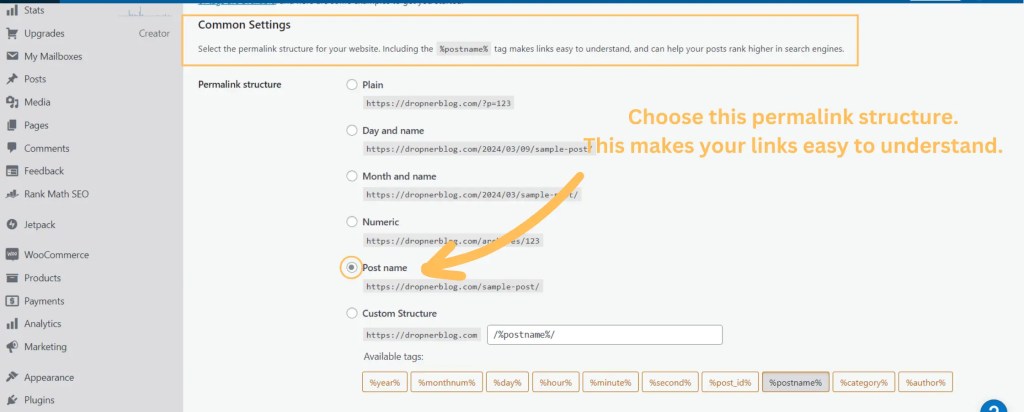
I do not recommend altering the permalink on a live site. It can have a potential negative impact on your existing search traffic.

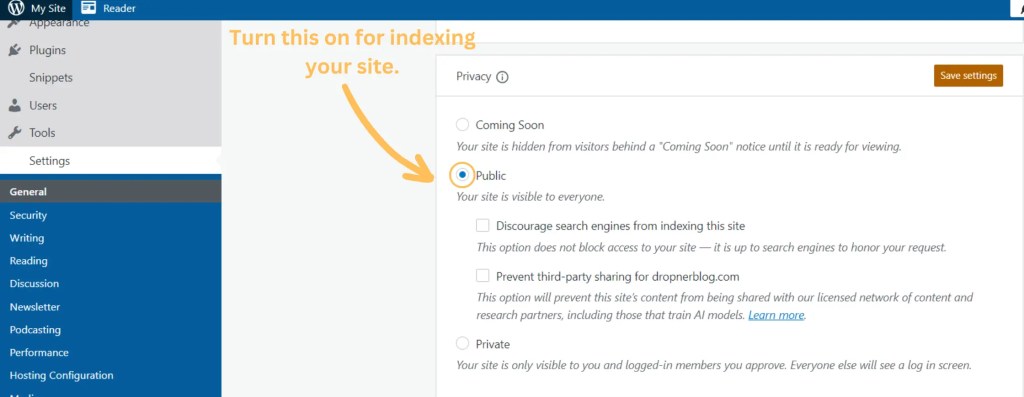
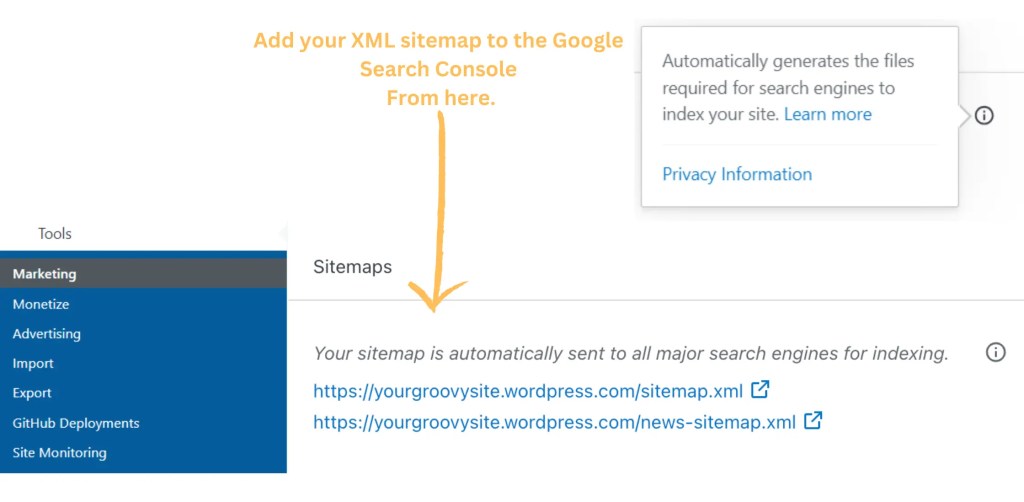
4. Use the given free WordPress SEO tools, such as sitemaps, and online visibility for indexing.
5. Have quality content by doing topic research.
6. Include 1 link from your own site.
7. Include 1 link from others who prefer higher in rank and related.
8. Keep your URL short with your keyword in it.
9. Use ALT Tags for images.
10. Write a description for the search results page.
SEO Strategy
Get Those Keywords for Your WordPress SEO
The main point of the text is that effective keyword research is crucial. This research is essential for improving the search engine performance of a WordPress website. By identifying the right keywords, website owners can make their content more visible to search engines and users.
Understanding what people are searching for enables website owners to create content that resonates with their target audience. This attracts more visitors and enhances the overall performance of the site.
Conducting good keyword research allows website owners to develop high-quality content that aligns with user interests. This leads to improved visibility. It also results in increased engagement and higher conversion rates.
10 Proven Tips to Identify Relevant Keywords for Your Blog Posts
- Understand Your Audience: Consider what your audience is searching for and what questions they may have.
- Use Keyword Research Tools: Utilize tools like Google Keyword Planner, SEMrush, or Ahrefs to identify popular and relevant keywords.
- Analyze Competitor Keywords: Look at the keywords your competitors are using to get insights into what works in your industry.
- Long-Tail Keywords: Opt for longer, more specific keywords to target a niche audience and reduce competition.
- Consider User Intent: Think about the intent behind the keywords and align them with the purpose of your blog post.
- Use Google Suggestions: Take advantage of Google’s autocomplete and related searches feature to find relevant keywords.
- Check Trending Topics: Keep an eye on current trends and include relevant keywords related to trending topics.
- Analyze Your Existing Content: Review your current content to identify keywords that have performed well in the past.
- Stay Updated on Industry Jargon: Use industry-specific terminology to target your audience effectively.
- Refine and Experiment: Continuously refine your keyword strategy based on performance and don’t be afraid to experiment with new keywords.
Keyword Research Tools and Plugins for Finding High-Ranking Keywords with Low Competition
Keyword research is crucial for SEO and content marketing. It involves targeting high-ranking keywords with low competition to improve search engine rankings. Keyword research tools and plugins are important for identifying these valuable keywords.
Here are three useful keyword research tools for finding the best keywords for WordPress SEO:
| Tool | Description |
|---|---|
| Google Keyword Planner | Google’s own keyword research tool is a popular choice for many digital marketers. It provides insights into search volumes, competition levels, and suggested bid prices for specific keywords. |
| Ahrefs | Ahrefs is a comprehensive SEO tool that includes a powerful keyword research feature. It offers data on keyword difficulty, search volume, and click-through rates, helping users identify lucrative keyword opportunities. |
| SEMrush | SEMrush is another all-in-one SEO suite that offers a robust keyword research tool. Users can analyze keyword trends, competition levels, and related keywords to uncover high-ranking, low-competition keyword targets. |
Marketers and content creators use these tools to help them choose the best keywords. This can improve their chances of getting more visitors to their websites without having to pay for ads.
Optimizing On-Page Elements
Optimizing on-page elements such as titles, headings, and meta descriptions is crucial for improving search engine visibility and user experience. These elements directly impact a website’s ranking and click-through rates. Titles and headings should be relevant and concise. They should feature important keywords to signal the page’s content to search engines and users.
Meta descriptions should accurately summarize the page’s content and entice users to click through. By optimizing these on-page elements, websites can enhance their organic search performance and attract more qualified traffic.
Quality content matters
Good content is super important for keeping people interested. It not only brings in readers but also shows that you know your stuff. Well-made content can help you rank better on search engines. This way, more people can find and enjoy what you have to say. That’s why it’s key to put effort into creating top-notch content for success on any online platform.
The content should connect with readers first, and then address the search intent. Start with an introduction, followed by an overview, and then a table of contents after the main content. Remember to research your topic.
In this way, you improve your blog. Check out this blog post for helpful tips.
How to optimize these elements using relevant keywords.
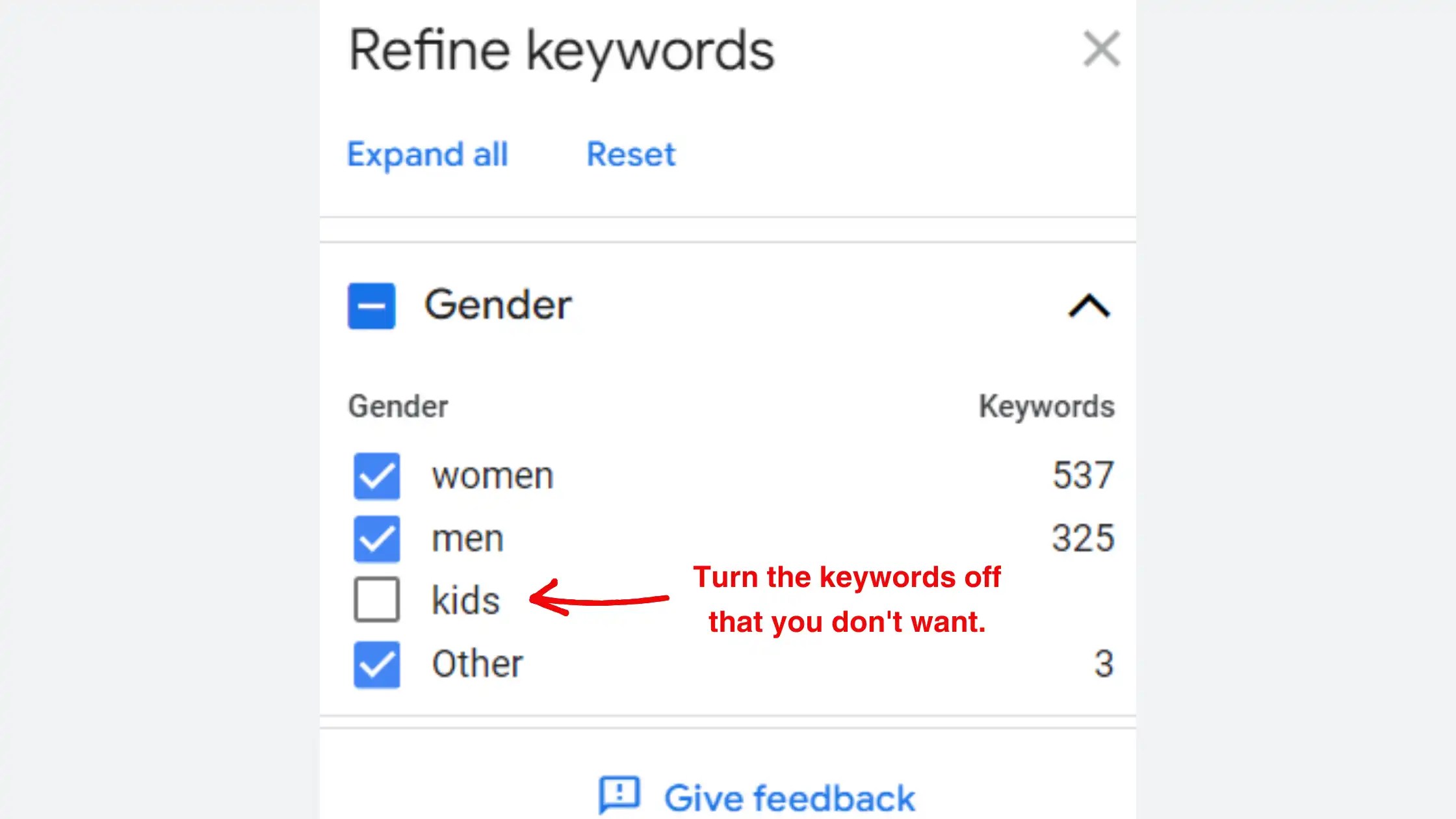
Using the right words in your content is important for creating good quality work. In the section below, you can learn how to do keyword research using Google Keyword Planner.



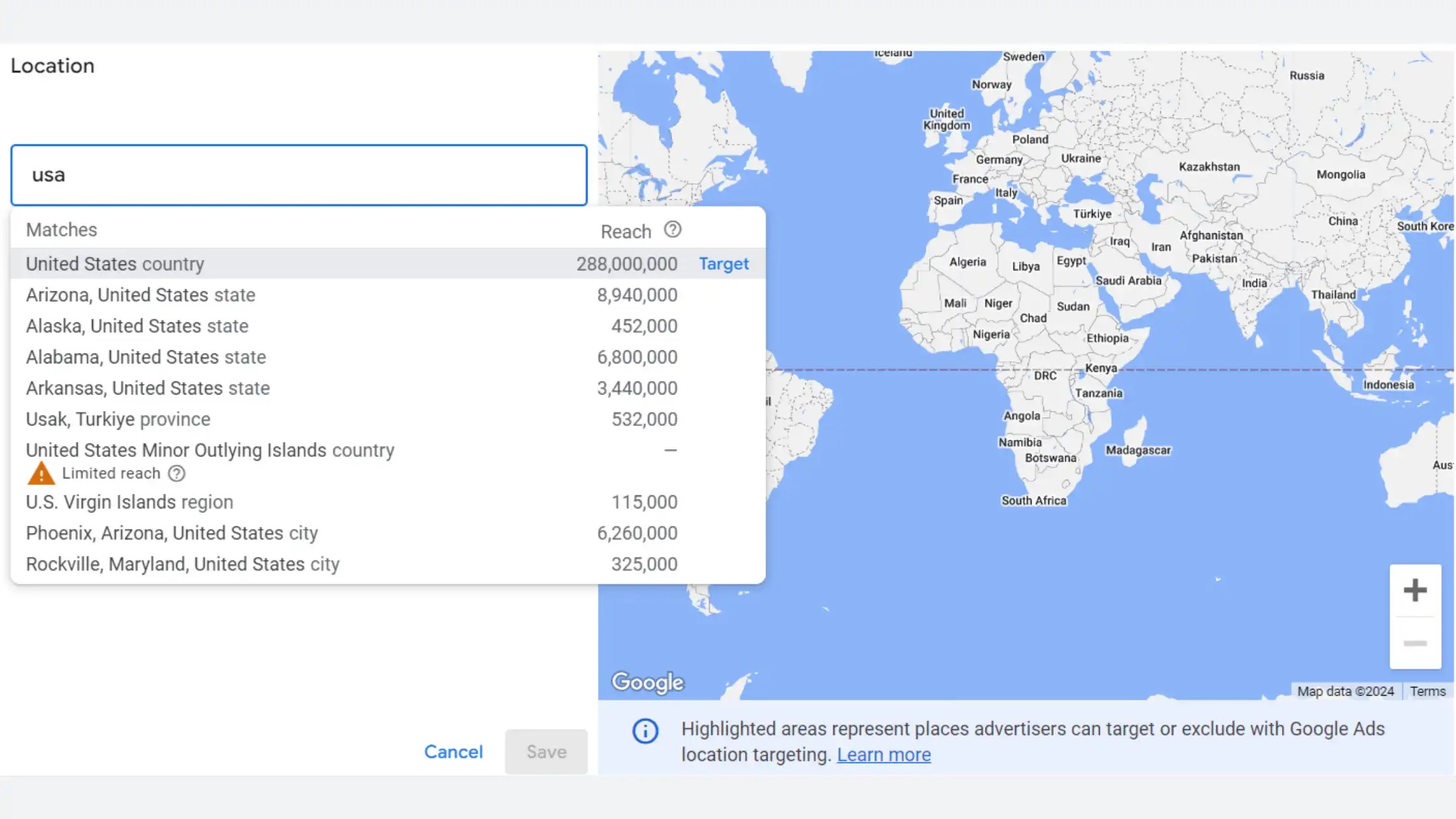


Using SEO plugins like Yoast SEO, All In One SEO, and Rank Math SEO can make it a breeze. These plugins help you optimize your website for search engines. These tools analyze your content. They give you helpful suggestions and optimize meta tags. This helps you boost your site’s visibility and ranking on search engine results pages without breaking a sweat.
So, on this blog, we’re all about that Rank Math SEO plugin. Check out the key points we focus on for SEO below. Feel free to click on the tooltips to head to the website and grab the plugin.

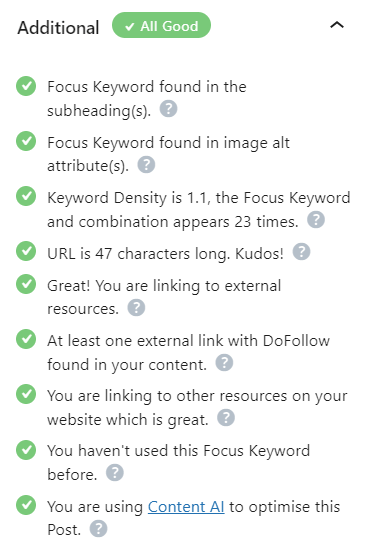


If you do it right, you can have a high SEO score.
Get the Rank Math plugin.
Creating High-Quality Content
By providing valuable information and a great user experience, your content can attract and retain readers. Additionally, it also satisfies search engine algorithms. This dual focus enhances the visibility and credibility of your content, leading to better engagement and higher rankings.
Incorporating keywords into your content in a natural manner holds significant importance for several reasons.
| Point | Reason |
|---|---|
| 1. | Firstly, it enhances the content’s discoverability on search engines, thereby benefiting users. |
| 2. | Secondly, it contributes to making the content more comprehensible and accessible to the audience. |
| 3. | Lastly, the organic inclusion of keywords signifies to search engines the relevance of the content to specific topics. This can potentially enhance its overall ranking. In summary, integrating keywords seamlessly is crucial for both search engine optimization and user engagement. |
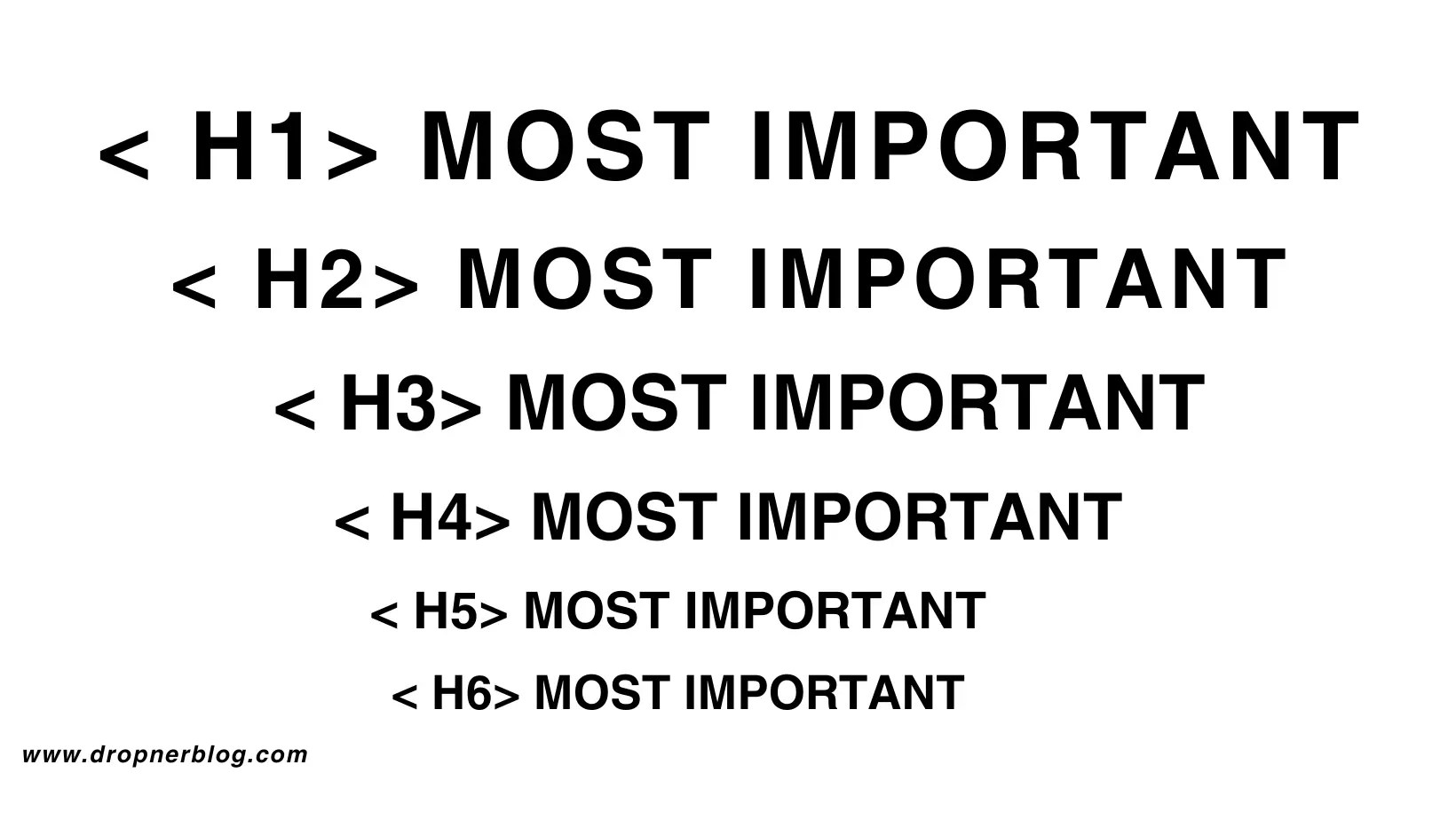
When structuring your blog posts, it’s essential to use headings to improve readability and WordPress SEO. Begin with a captivating title and utilize H1 for this. The following sections can use H2, H3, and so on to create a hierarchy of information.
This helps readers navigate the content easily and signals to search engines the important topics in your post. Additionally, incorporate relevant keywords in the headings to enhance SEO.
See the headings example below.
Building Quality Backlinks
Backlinks play a crucial role in improving your WordPress blog’s SEO. They act as a vote of confidence from other websites. When reputable sites link to your content, search engines view your blog as trustworthy. They see it as authoritative. This can positively impact your search engine rankings.
Additionally, backlinks can drive referral traffic to your blog, expanding your audience and enhancing your overall SEO strategy. Acquiring quality backlinks from relevant and authoritative sources is essential for maximizing the visibility and credibility of your WordPress blog.
If you wanna score some top-notch backlinks from legit sites, there are a bunch of cool strategies. These strategies will get you there! First off, focus on creating absolutely killer content.
This type of content naturally grabs attention. Think original research, comprehensive guides, and captivating infographics. Building strong relationships within the industry can also open doors for valuable link opportunities.
Don’t forget about the power of guest posting on authoritative sites. Seek out broken links to swoop in and save the day. Keep an eye on your backlink quality, and you’ll be well on your way to a rock-solid backlink profile!
Importance of Guest Blogging, Social Media Promotion, and Networking with Other Bloggers
Guest blogging, sharing on social media, and connecting with other bloggers are crucial for expanding your online presence.
Guest blogging allows you to reach a new audience and build authority in your niche. Social media promotion helps spread your content and engage with your followers.
Networking with other bloggers can open up collaboration opportunities and provide valuable support.
Conclusion
In conclusion, the 10 essential WordPress SEO Tips are:
- Use WordPress SEO plugins.
- Optimize your image by compressing them. Get more insights about compressing image websites.
- Use a clear link structure by editing the permalink.
- Use the given free WordPress SEO tools, such as sitemaps, and online visibility for indexing.
- Have quality content by doing topic research.
- Include 1 link from your own site.
- Include 1 link from others who prefer higher in rank and related.
- Keep your URL short with your keyword in it.
- Use ALT Tags for images.
- Write a description for the search results page.
To encourage you to improve your WordPress SEO, consider the benefits of enhancing your blog for search engines. This will help you attract more natural traffic and increase your visibility over time.
If you find this content helpful, feel free to follow, like, share, or rate it! Your support means the world to us.
FAQ
The top 10 WordPress SEO plugins are as follows:
| Plugin Name | Description |
|---|---|
| Yoast SEO | An all-in-one SEO solution for WordPress websites. |
| All in One SEO Pack | Feature-packed plugin with advanced options. |
| SEOPress | All-in-One SEO Pack |
| Rank Math | Offers an intuitive interface and essential SEO features. |
| The SEO Framework | Focuses on providing an unbranded and speedy SEO solution. |
| Squirrly SEO | Assists in content optimization for improved search engine rankings. |
| Broken Link Checker | Monitors and fixes broken links on your website. |
| All in One Schema Rich Snippets | Enhances your site’s appearance in search results. |
| SEO Squirrly | Helps content creators write quality, SEO-friendly articles. |
| SmartCrawl | Automatically optimize your site for better search engine visibility. |
10 Strategies to improve SEO and optimizing On-Page elements for WordPress Bloggers:
| No. | Task |
|---|---|
| 1. | Choose a Reliable Hosting Provider: Select a reputable hosting provider that ensures fast loading times and minimal downtime. |
| 2. | Optimize Permalinks: Customize your permalinks to include keywords and make them SEO-friendly. |
| 3. | Install an SEO Plugin: Use an SEO plugin to streamline optimization tasks and improve on-page SEO. |
| 4. | Create High-Quality Content: Consistently produce valuable, informative, and original content to engage readers and attract inbound links. |
| 5. | Enhance Site Speed: Improve website loading speed by optimizing images, using caching, and choosing a reliable theme. |
| 6. | Utilize Internal Linking: Integrate internal links within your content to enhance user experience and guide search engines through your website. |
| 7. | Optimize Images: Utilize descriptive file names and ALT tags for images to improve accessibility and enhance SEO. |
| 8. | Leverage Social Media: Share blog posts on social media platforms to increase visibility and engagement, potentially leading to more backlinks. |
| 9. | Mobile Optimization: Ensure the website is responsive and provides a seamless user experience across various devices. |
| 10. | Monitor Performance: Regularly analyze website analytics and SEO performance to identify areas for improvement and track progress. |
SEO is a make-or-break factor for WordPress blogs, as it dramatically amplifies their visibility in search results. Through the strategic use of keywords and links, blogs can allure a wider audience and solidify their standing. Furthermore, SEO is the cornerstone of trust and an enhanced browsing experience. Its significance cannot be overstated in the triumph of a WordPress blog.
Top 10 SEO Tools and WordPress SEO plugins.
| Tool | Description |
|---|---|
| Yoast SEO | A popular plugin that helps optimize on-page content for search engines. |
| SEMrush | Provides comprehensive keyword research, backlink analysis, and competitor insights. |
| Google Search Console | Offers valuable data about website performance in Google search results. |
| Ahrefs | Assists with keyword research, content optimization, and link building strategies. |
| Assists with keyword research, content optimization, and link-building strategies. | Another powerful plugin for optimizing WordPress websites for search engines. |
| Moz | Offers tools for keyword research, link building, site audits, and rank tracking. |
| SEOquake | Provides an SEO toolbar and browser plugin to conduct on-page SEO audits. |
| Rank Math | A powerful SEO plugin for WordPress with features like schema markup and redirections. |
| Screaming Frog | A website crawler that helps identify SEO issues and provides website insights. |
| Google Keyword Planner | Assists in finding the right keywords for content optimization and ad campaigns. |
These tools can greatly assist website owners and marketers in enhancing their SEO efforts on WordPress.
When it comes to measuring SEO success on a WordPress blog, keep an eye on metrics like organic traffic, keyword rankings, backlinks, and conversion rates. Tools like Google Analytics, Google Search Console, and WordPress SEO plugins can help you stay on top of these important indicators.
Also, pay attention to the click-through rate from search engine results pages – it’s a great way to see how well your SEO efforts are paying off. By regularly checking these metrics, you’ll have a good sense of how your SEO strategies are working and can make any necessary tweaks.

 Dropner Graphic Explainer