
Written By Bonny Isselt.
In this blog post, we share a detailed step-by-step plan for designing an app in Canva. We discuss how you can use Canva to create attractive and user-friendly designs and provide tips and tricks to make your app look professional. Whether you are a beginner designer or have experience, this plan will help you on your way to a successful app.
Overview
- In this article, you get the best practice for designing an App.
- We use Canva for the design process.
- To summarize the key points: always have the target audience in mind.
Table of Contents
Step-by-step Plan for Designing an App in Canva:
The first thing to do is to decide what the app is for and who will use it. When you know who it’s for, it becomes a piece of cake. This content is also for other designers who are interested in the behind-the-scenes design process.
Step 1. Create a Canva account and choose the mobile wireframe template

Step 2. Choose 4 frames
We will be creating:
- The login page.
- The profile page.
- The buy page.
- Log Out page.
Align the design with the brand.
When you design your app’s look, make sure to pick colors, fonts, and images that sync with your brand. Sticking to your brand’s colors helps keep everything looking smooth and recognizable.

Picking fonts that suit your brand’s style can also help you connect better with the target audience. Choosing images that match your brand can bring the brand’s story to life and make the user experience even better.
Step 3. Designing the login page
The login page’s got 3 main sections: the usual login, signing up for a new account, and resetting your password.



Step 4. Designing the profile page
In this phase, you need to consider what type of information is relevant to the end user and it should be presented simply.
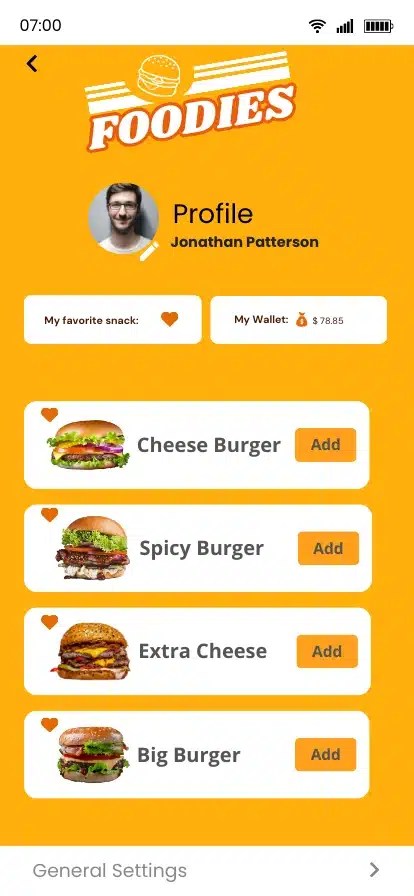
App design in Canva is fast and good | Personal experience
The app design in Canva is simple, and you can place and move everything quickly.
Sometimes I’m totally blank when it comes to designing. I usually start with Canva templates and then tweak them to fit my needs. I use these designs for my clients and also as an inspiration for others.
Step 5. Creating the buy page
In the final step, we focus on concluding the design process. The goal is to ensure a straightforward and transparent purchasing experience for the customer, allowing them to quickly understand their purchase and confirm their decision.
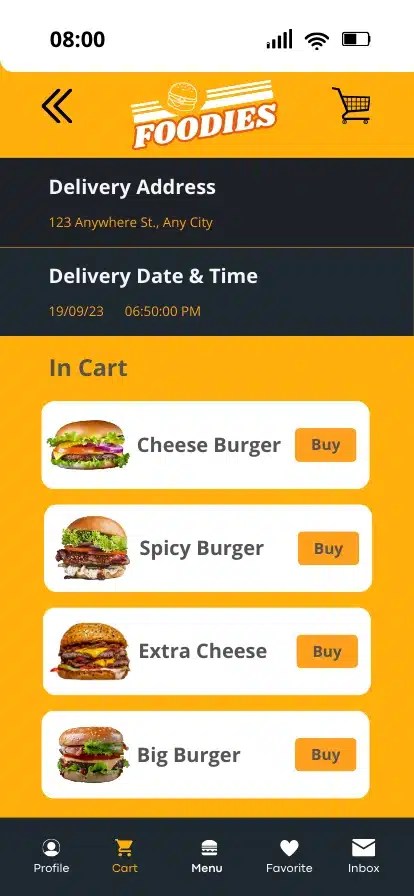
Finalize the app design and export it in the required format for development.
The way you format apps really depends on stuff like the platform (iOS, Android, etc.) and what the app is trying to do. You gotta make sure you’ve got the right pictures, like icons, drawings, and backgrounds, in the right formats and sizes.
Sometimes that means using SVG files for pictures that can scale and using different formats and sizes for images and icons on different devices.
And of course, it’s super important to stick to the UI/UX rules of the specific platform to make sure the user experience is consistent. Reach out for mobile app development on Fiverr.
Conclusion
In conclusion, designing an app in Canva is not difficult but you need to be persistent, resourceful, and forward-thinking to deliver good results. Additionally, you must not forget the target audience.
By exploring Canva’s tools and resources, users can find new ways to bring their ideas to life. They can create social media graphics, presentations, and marketing materials.
Using Canva to its fullest allows individuals to improve their design skills and make high-quality visuals.
I encourage everyone to explore Canva’s platform for endless possibilities to boost their creativity and elevate their design projects.
To sum up the key steps in designing an app using Canva:
- It must be logical.
- Emphasize the user experience and visual appeal in app design.
Like, comment, or share. If I missed anything, please tell me in the comments. Thank you.

 Dropner Graphic Explainer