
Introduction to Creating Stunning Photo Manipulations with Canva
Creating stunning photo manipulations with Canva is just playing around with pictures to make them look cooler or tell a better story using digital tools.
Nowadays, it’s super important because it helps people and businesses create awesome stuff for ads, branding, and storytelling.
Canva has become super popular because it’s easy to use and can help you make some really amazing visuals.
This blog post is about how to use Canva to create awesome photo manipulations that will impress your audience and convey your message perfectly.
Summary
- In this blog post, you get the creative design process in photo manipulation.
- Furthermore, this article shows you a video with those steps, so you can follow along.
- Lastly, you can download this Canva template, so you can make edits.
Step 1. Choose a blank canvas
The first step is to visit Canva and select a blank canvas. Look for a coffee cup like the one in this example.

Center the coffee cup
Make the coffee cup bigger and click on the → position button in the upper left corner. From there you can arrange the coffee cup.
Step 2. Select a circle frame
Place the frame on top of the cup to create the illusion of something inside. Ensure the frame fits the cup like a placeholder for a photo.

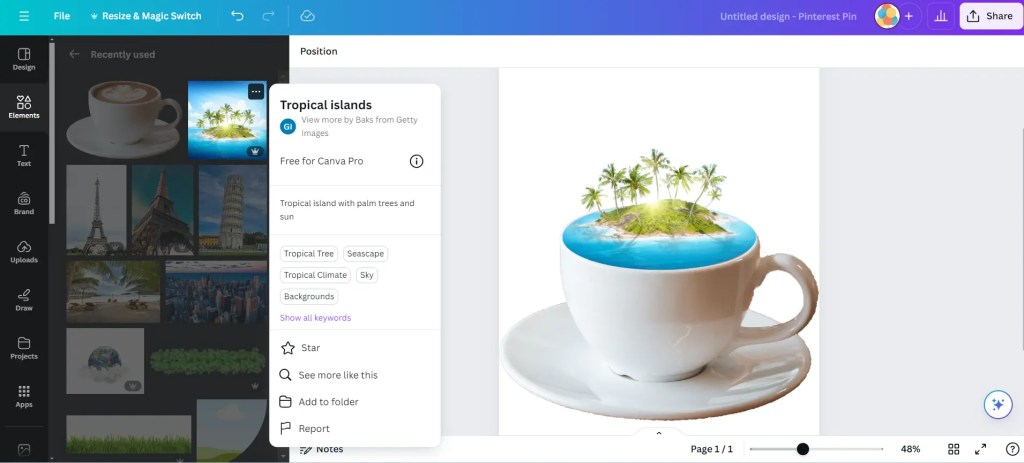
Step 3. Search for a tropical island
The next step is to find a tropical island and place it in the background of the coffee cup. Remove the background using Canva’s background remover or visit a free site for background removal. For creating this stunning photo manipulation.

Step 4. Framing the image
Copy the image of the island place it in the frame, and make some adjustments to the background island image to match the front image. Erase the blue parts that are outside (the left and right side) of the coffee cup.
Step 5. Making the tear
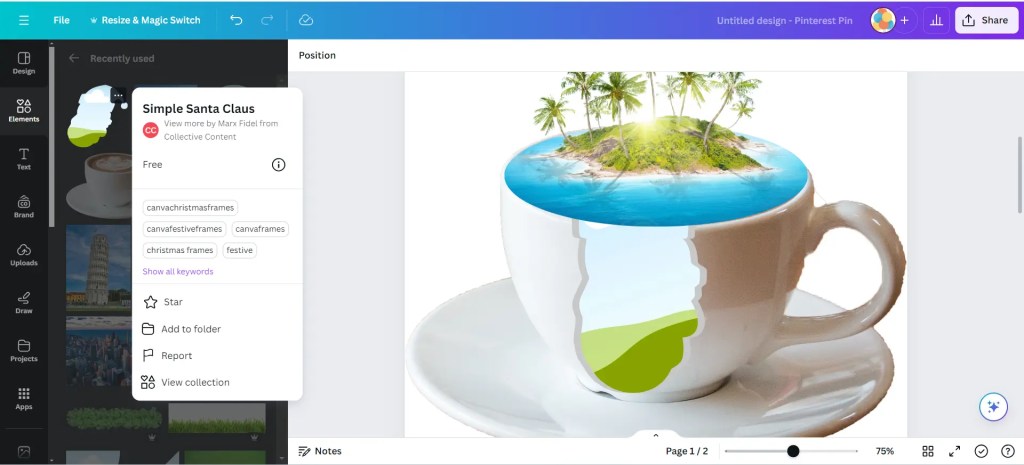
You will be creating a tear on the side using a Santa Claus frame, which enables you to simulate a tear. Use the color (dark grey) of the photo to create a tear effect. Duplicate the frame and send it in the back of the water frame.
The final step is to watch the video
I’ve shortened the article and turned it into a video, allowing you to sit back, relax, and replay it as many times as you want.
Do you want to know which techniques I used for this photo manipulation? Watch this video to kick things off!
Conclusion
In short, making impressive photo manipulations with Canva requires understanding the design process.
With good examples and explanations, you can start your design journey.
The benefit is that it can lead to successful advertisement campaigns.
See more of my stunning photo manipulation work
Other photo manipulation work to explore.


Looking for graphic design for your business website and social media?
What will you design today? Let me know if this article is helpful.
Give this a like and follow my blog. Please share in the comments if I have forgotten something.
Type 👉 agree 👈 (also in the comments) if you agree with this.

 Dropner Graphic Explainer