
Introduction to must-have Canva Apps.
Are you tired of creating the same old designs using Canva? Do you want to take your design game to the next level? Look no further!
We have compiled a list of must-have Canva apps that will revolutionize your design experience and make your creations stand out.
Canva has quickly become a popular design tool for professionals and amateurs alike. With its user-friendly interface and extensive array of templates and graphics, Canva has made design accessible to everyone.
However, with the rise in popularity, there has also been an increase in the demand for additional features and functionalities.
If you are looking to enhance your Canva designs and unlock new creative possibilities, incorporating Canva apps into your workflow is essential.
These apps offer unique features, templates, and assets that will elevate your designs and make them truly exceptional.
In this article, we will explore the top must-have Canva apps that will take your designs to the next level.
Overview
- You will get an in-Canva app so you have an idea of what to look for.
- You get tips on how to use it in your designs.
- We explain the pros and cons of each app.
Table of Contents
Why are visuals so powerful?
Visuals are more likely to trigger emotion.
Studies confirm that visuals transfer the message faster. [Source: Shift].
Key statistics.
- The brain can see images that last for just 13 milliseconds.
- Our eyes can register 36,000 visual messages per hour.
- We can get a sense of a visual scene in less than 1/10 of a second.
- 90% of information transmitted to the brain is visual.
- Visuals are processed 60,000 times faster in the brain than text.
- 40 % of nerve fibers are linked to the retina.
So you know why adding visuals to your design project is crucial. Visuals can help the customer understand the offer, and it speeds up the buying process.
1. TypeCraft

A great way to give your text a new dimension is a Canva app called Typecraft.
TypeCraft is a Canva app that lets you customize text creatively. This app allows you to give text new perspectives and shape it how you want it to look.

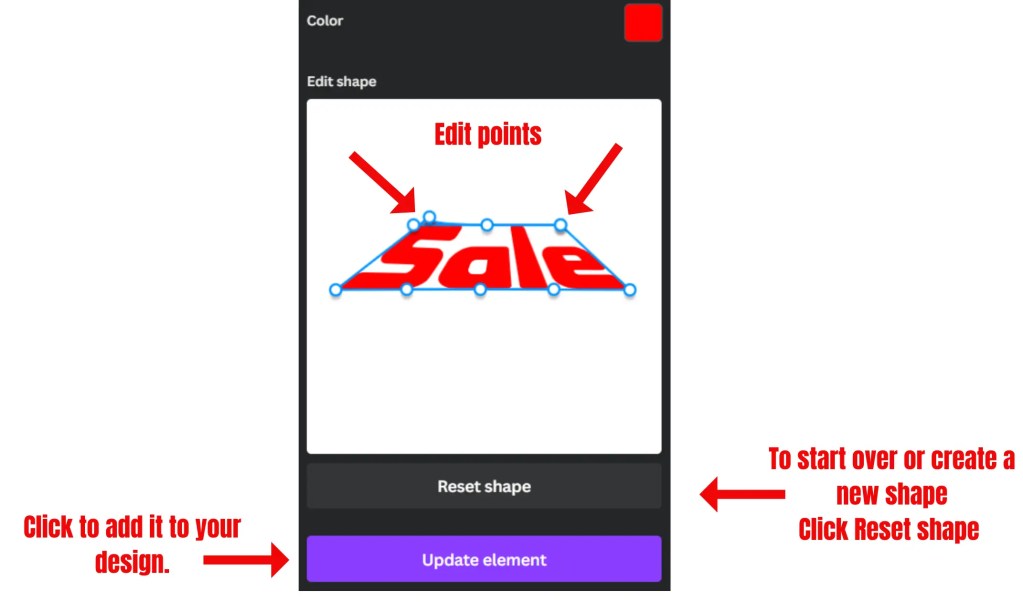
Here is the image created with TypeCraft.

| Pros | Cons |
|---|---|
| ✅ It is simple to edit text and shape it. | ❌ Require practice. |
| ✅ Free. | ❌ Require spatial insight. |
| ✅ Easy to edit color. |
Why should you use it?
To give your designs new depth, you can easily emphasize offers.
The key benefits of TypeCraft are:
1. Creative Text Customization: TypeCraft allows you to customize your text creatively and give it a new perspective. You can shape the text the way you want it to look, which can add depth to your designs.
2. Easy Editing: It is simple to edit text and shape it using TypeCraft. You can easily change the color, size, and font of the text to match your design.
3. Free to Use: TypeCraft is a free Canva app, which means you can use it without additional cost.
4. Enhance Offers: By using TypeCraft, you can easily emphasize offers and make them stand out in your designs. This can help you grab the attention of your target audience and drive more conversions.
2. TypeGradient

Are you looking to add multicolors to your font? Then, this Canva app is for you.
TypeGradient is a free Canva app. With TypeGradient, you can easily create multicolored text and customize it to match your design. It is free to use and offers a wide range of gradient styles to choose from. Here is my blog post about TypeGradient, where I demonstrate how it works.
| Pros | Cons |
|---|---|
| ✅ Create mesmerizing text effects. | ❌ Limited customization [only the font]. |
| ✅ Easy to use. | ❌ Learning curve. |
| ✅ Boost creativity. | ❌ Dependence on Canva. |
| ✅ Free |
Why should you use it?
Give your text multicolored effects and enhance the creativity of your designs.
The key benefits of TypeGradient are:
1. Visual Appeal: Gradients can add depth and visual interest to your text, making your designs stand out.
2. Customization: You can customize the colors in your gradient to match your design or brand colors.
2. Ease of Use: TypeGradient is user-friendly and doesn’t require any design experience to use.
3. Integration: It can be used with other design tools, making it a versatile addition to your design toolkit.
💡Please note: do not overdo it by adding more colors than needed.
3. Character Builder

Character Builder is an app created by Canva. With it, you create custom-made characters. You can choose a mixture of facial expressions, hair color, skin tone, and body types to create your unique character. Here is example of how to build a character.
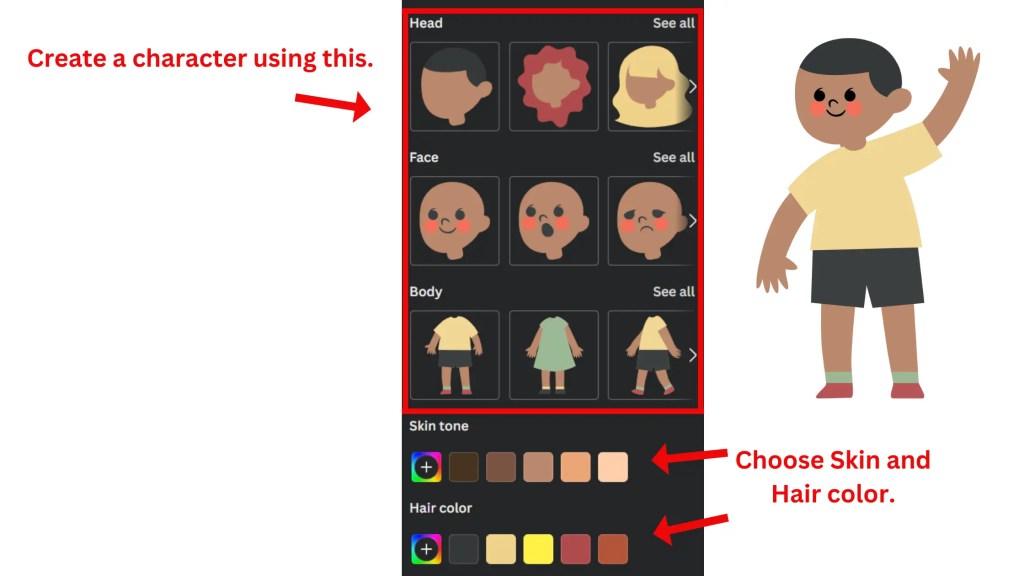
| Pros | Cons |
|---|---|
| ✅ Free. | ❌ The library is limited. |
| ✅ Ability to change colors. | ❌ Customization is limited. |
| ✅ Easy to use. | ❌ No 3D characters. |
| ✅ Add it to your Canva design. |
Why should you choose it?
For adding unique characters to your designs. And to enhance interaction between the created characters. Also, to create a comic design style.
The key benefits of Character Builder are:
1. Customization: You can build your character by choosing from a variety of different faces, bodies, and expressions. This allows you to create a unique character that can be embedded into your design.
2. Integration with Canva: The Character Builder is integrated with Canva, which means you can easily add your created character to any design you are working on within Canva.
3. AI Avatar Generator: Canva also offers a free AI avatar generator, called the Headshot Pro app, which can instantly produce an avatar out of any photo. It can be a quick and easy way to create a character if you have a specific image in mind.
4. Online Personality: These characters can be used as your digital alter ego, representing you on any platform. This app can be particularly useful for establishing your online personality.
5. Brand Representation: If you’re using Canva for business purposes, these characters can be used in marketing posters or as avatars that reflect your brand.
4. Speedpaint

Speedpaint is a must-have Canva app for video creators. The app converts any image into [short] videos. With a drawing hand feature, the viewer can simply follow your design.
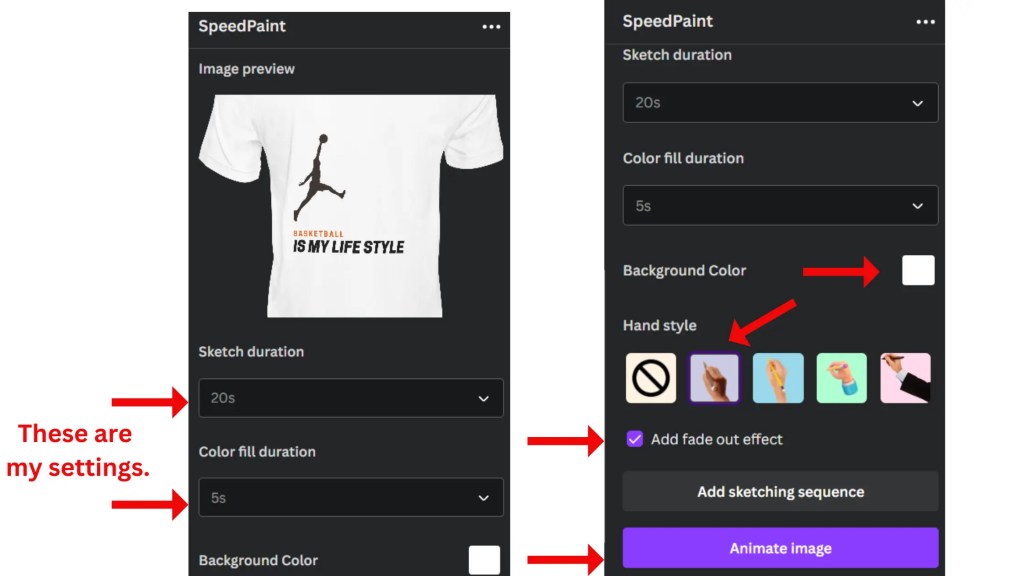
| Pros | Cons |
|---|---|
| ✅ Free. | ❌ Short videos. |
| ✅ Ability to turn any image into videos. | ❌ Process time can be long duration. |
| ✅ Videos can be uploaded to YouTube. | ❌ The whiteboard style is not better than Animaker. |
| ✅ Easy to use. |
Why should use it?
Show your creative skills and turn them into bite-sized videos for educational purposes.
The key benefits of Speedpaint are:
1. Convert Images to Speed Drawing Videos: SpeedPaint allows you to transform any image into a Speed Drawing Video with a single click. This feature can be used to create engaging content for various purposes.
2. User-Friendly: SpeedPaint is known for its user-friendly interface. It enables users to create speed-drawing videos quickly and easily.
3. Wide Range of Drawing Tools and Canvas Sizes: With its extensive range of drawing tools and canvas sizes, users can create professional-looking videos that showcase their artistic skills.
4. Unique and Fun: The app transforms your uploaded photos into a sketch and then gradually fills them in, creating a beautiful painting video. It’s quick, unique, and loads of fun.
5. Educational Tool: SpeedPaint can be integrated with your learning management system, making it a good tool for creating and collaborating visually in the classroom.
5. Katapp

Looking for a quote to inspire others? Katapp is a must-have Canva app that focuses on factional quotes, and it covers a wide range of quotes from businesses to fitness enthusiasts.
| Pros | Cons |
|---|---|
| ✅ Free. | ❌ Random quotes. |
| ✅ Wide range of quotes. | ❌ It does not have the option for targeted quotes. |
| ✅ Easy to use. | ❌ Lots of attempts. |
| ✅ Unlimited attempts. | |
| ✅ Translation is possible. |
Why should you use it?
However, the many attempts you get for a quote that fits. It is free of charge for those attempts. The app is in some cases handy when quotes are a part of your business.
The key benefits of Kattapp are:
1. Offers a wide range of quotes: Kattapp has a large database with factional quotes of top leading people.
2. Delivers the best quotes fast: Are you looking for quotes that inspire? Because of the many trials, this app can boost productivity as it produces quotes quickly.
3. Free and integrated with Canva: You can use this app for free and easily add it to any Canva design.
6. Magic Media

This app is created by Canva, and this app helps you to design unique designs including videos. [Videos are powered by Runway].
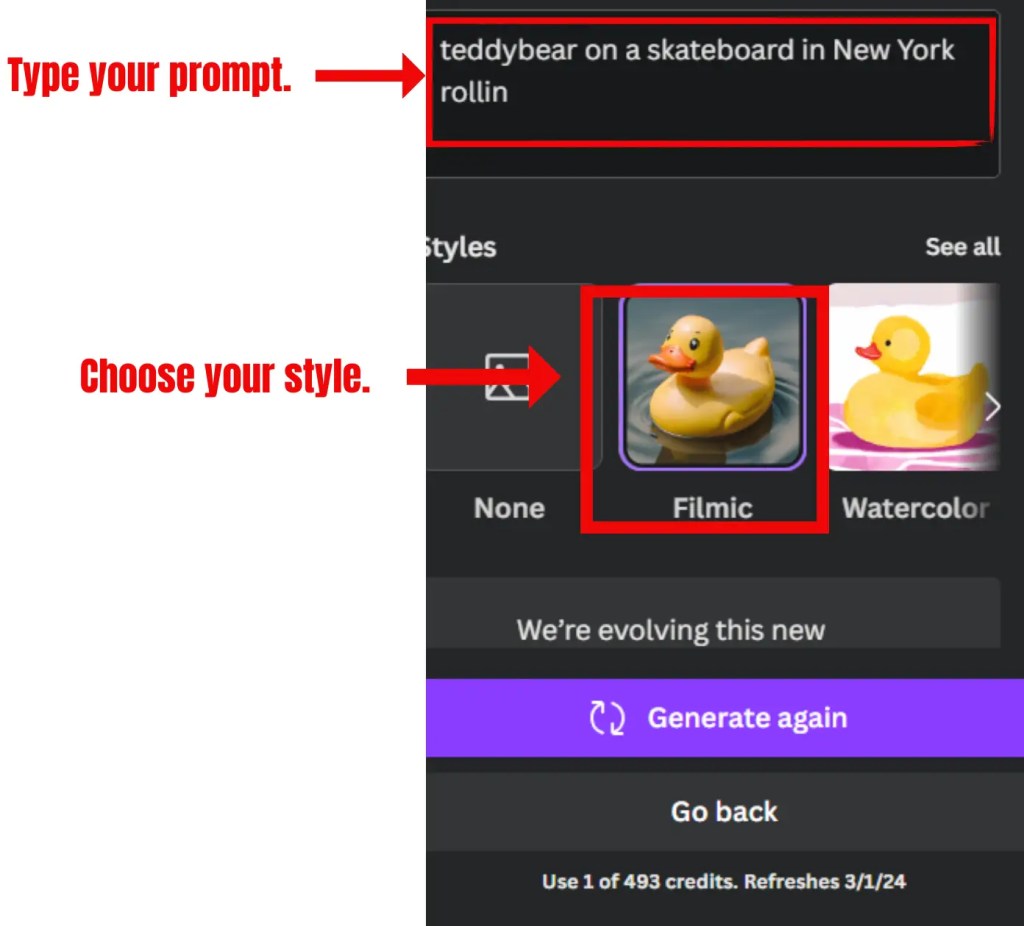



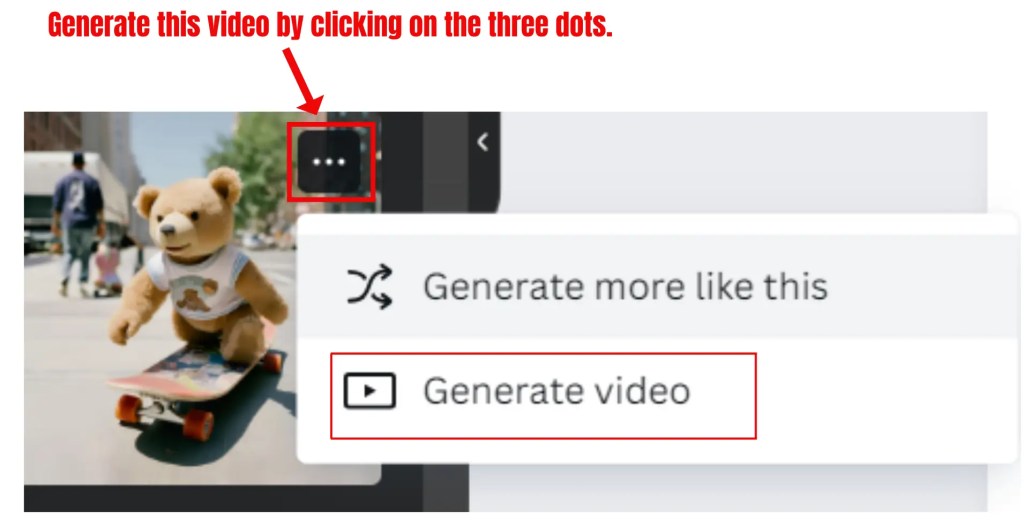
This a must-have Canva app for designers to generate one-of-a-kind images. You type the description and hit the generate button. It uses 1 credit per generated image, and you get 500 credits plus refreshes every month.
| Pros | Cons |
|---|---|
| ✅ Great quality images. | ❌ The video generator does not always give the best outcome. [This is a Beta version]. |
| ✅ Free. | ❌ Too few credits. |
| ✅ Ease to use. | ❌ Credits run out quickly. |
| ✅ Provide a great way to describe the image. |
Why should use it?
Magic Media is an app that helps designers create unique designs. So if you are stuck with coming up with design ideas Magic Media is for you.
The key benefits of Magic Media are:
1. Create from Description: You can create an image or video from a description. Just describe what you want, and Magic Media will generate it for you.
2. Text to Video: Magic Media can generate a video from text. It is particularly useful for creating engaging content for social media or presentations.
3. Variety of Styles: When generating an image, Magic Media offers a wide range of styles to choose from. It allows you to create visuals that align with your brand or personal aesthetic.
4. Account-Based Limitations: Magic Media’s limitations depend on the Canva account type you have. Some features may be exclusive to premium accounts.
7. Product Studio

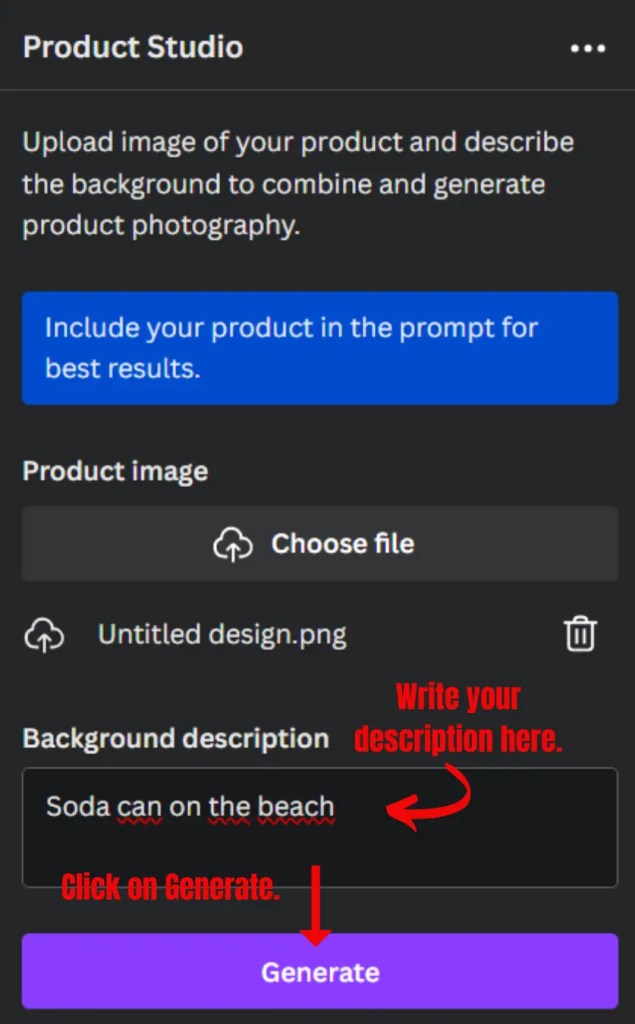
This must-have canva app is best for product creators and your e-commerce store. It uses an AI prompt generator, so you must enter a descriptive prompt to create and replace the background image with a whole new environment. Here is an example of how to start with Product Studio.

| Pros | Cons |
|---|---|
| ✅ Free. | ❌ Processing time can take long. [due to the many requests]. |
| ✅ Easy to use. | ❌ The pictures it produces are not the greatest. |
| ✅ AI integrated. | ❌ You have to retry a lot. |
Why should use it?
This Canva is a good choice when you are in the working area of pitching and launching products for cheap.
The key benefits of Product Studio are:
1. Create an image from a single prompt easily: Describe the image you want in detail and let the product media do its work.
2. Free to use: This app is free to use, and it is a good addition to product design.
3. Change background creativity: You must practice, but you can use it to promote the product on a creative level.
Tips for Canva designers
- Keep it simple when you choose colors.
- Only pick the app that is practical and useful to you.
- Learn simple graphic design basics.
- Keep learning.
- Look for tutorials with proper explanations.
- Look for examples that guide you in what you are looking for.
Conclusion
So there you have the top 7 must-have canva apps. With those apps, you can create good-looking designs for your design business needs, as well as for your clients.
Let this article lead you in creating stunning designs.
The key points are:
- The app must be free.
- The app must be easy to use.
- The app must have AI functions.
- The app must have practical use.
 Dropner Graphic Explainer