
Introduction to method to compress PNG or JPEG to 80%
In today’s digital landscape, organized by Google, it is important to have a speedy website. The best method to compress PNG or JPEG is knowing the benefits of image compressors. The purpose of an image compressor is to reduce the size of the image file. This leads to improved user experience. It also offers SEO advantages.
It needs to show quick results and be user-friendly. Other paid tools are only suitable for people willing to pay. A good image compressor offers a free and paid option.
This blog post provides you with simple tips. It also shows the best method to compress PNG or JPEG up to 80% of their original size.
Overview
- This blog post will teach you the basics of optimizing images and the recommended settings.
- Furthermore, we mention the positive impact on SEO ranking.
- We’re looking at the free image PNG and JPEG compressor tool from Websiteplanet. And see how they stack up against other companies in the market.
Table of Contents
Mini Case Study – Review:
Most image compressors produce similar shrinkage results. We compared the most popular image compressors and displayed the results side by side. Also, the tool from Websiteplanet.com offers similar image compression with high results that are good for loading time and website speed.
Ultimately, you decide which option is best for you after reviewing this case study. Experiment with different compression rates for the best results.


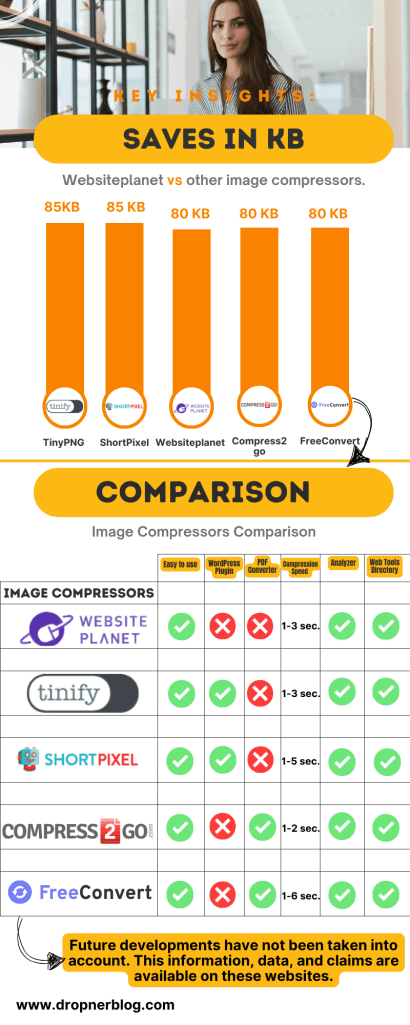
File compression is like a magic trick for websites, making them faster and more efficient by shrinking the size of images, CSS, and JavaScript files. This means a better experience for users and some cash saved for website owners, thanks to using less bandwidth.
Plus, it makes websites more accessible on different devices and network conditions. Basically, file compression is key for top-notch website performance and keeping visitors happy.
Benefits of Compressing PNG and JPEG Files
Compressing PNG and JPEG files has many benefits. It makes websites load faster, reduces bandwidth usage, and improves SEO rankings. This improves user experience by making websites load quickly. It also helps save data and makes the website more visible on search engines.
File compression is essential for businesses as it helps save storage space and improve website efficiency. Businesses can store more data on their servers by reducing the size of files. This leads to cost savings and improved performance.
When files are compressed, they can be transmitted faster over the internet, enhancing the website’s loading speed.
This can result in a better user experience and higher search engine rankings. File compression is a valuable tool for businesses looking to optimize their storage and website performance.
Step-by-Step Guide:
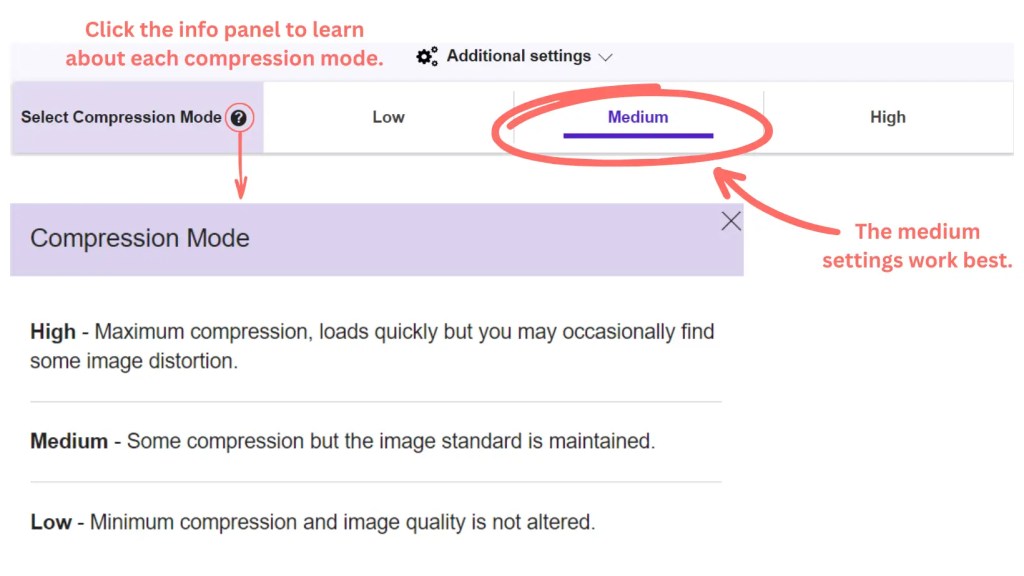
To ensure your images look good, follow these steps. First, go to settings and select medium quality for nice, clear photos.
If you want a smaller file size and don’t mind some image distortion, choose the high-quality option for faster loading.
💡Pro Tip. I recommend starting with the medium compression setting for a good balance. After a few weeks, try the high-compression setting.
The tool is easy to use: simply drag and drop the file from your computer into the image compressor. It only takes about 1 to 2-3 seconds. This is really fast. You can decrease the size of the image and see the savings.
Once you’re satisfied with the results, just click to download it.

Conclusion
To summarize the key points discussed in this blog post, using image compressors brings many advantages. It’s the ideal method for reducing the size of PNG or JPEG files. This is especially useful for bloggers, website owners, and entrepreneurs who utilize a large number of images.
Key points to remember:
- Image compressors are for SEO webspeed.
- It reduces the storage space.
- Better user experience.
- Must be free, straightforward, and easy to use.
The tool is important for bloggers, website builders, business owners, photographers, and graphic designers. Who use PNG or JPEG image files. Online compression is quick, showing smaller file results in seconds for easy and fast uploading.
You absolutely must give this tool a shot. Dropner Blog.com.
FAQ (Frequently Asked Questions)
To improve your website’s speed, compress PNG and JPEG images.
- To reduce the image file size by 80% for site optimization, you can use various methods such as resizing the images, using image compression tools, converting images to modern formats like WebP, and utilizing lazy loading techniques to defer loading offscreen images.
- Additionally, optimizing the images for the web by reducing color depth and removing unnecessary metadata can further contribute to significant file size reduction. Regularly auditing and optimizing images on your website is crucial for enhancing user experience and site speed.
Compressing images is important for making websites load faster. It reduces the size of the images so they can load quickly. This improves the user experience and makes the website accessible to people with slower internet or less powerful devices.
To reduce the size of your PNG and JPEG files, you can use methods like compression for PNGs and adjusting the quality for JPEGs. For Websiteplanet.com users, selecting medium or high settings can make them 70% – 80% smaller without significantly affecting the image quality.
With JPEG files, it’s important to find the right balance between size and image clarity by adjusting the quality level. Tools such as JPEGmini or TinyJPEG are also effective for compressing JPEG files.
When you compress images for your website, it can help your site’s SEO performance in a few ways:
| Key | Value |
|---|---|
| Faster Loading | Smaller image sizes mean your website loads faster, and faster sites can rank higher in search results. |
| Improved User Experience | Visitors don’t like waiting for slow websites, so faster loading times can improve user experience and engagement. |
| Reduced Bounce Rate | If your site loads quickly, visitors are more likely to stay and explore, which can lower your bounce rate. |
Overall, compressing images can help your website’s SEO by making it faster and more enjoyable for visitors.

 Dropner Graphic Explainer
Good methods well shared 👍
LikeLike
Thank you! 👍👍
LikeLike