Pinterest for Bloggers: Display Your Best Pins in WordPress
Hi bloggers and new followers,
If you want to get more out of both WordPress and Pinterest, it’s worth learning how to design an ideal pin and embed it directly into your WordPress posts. Pinterest can become a powerful traffic source for your site (around 50–60% for many creators). And let’s be honest—every blogger wants more quality traffic; I know I do.
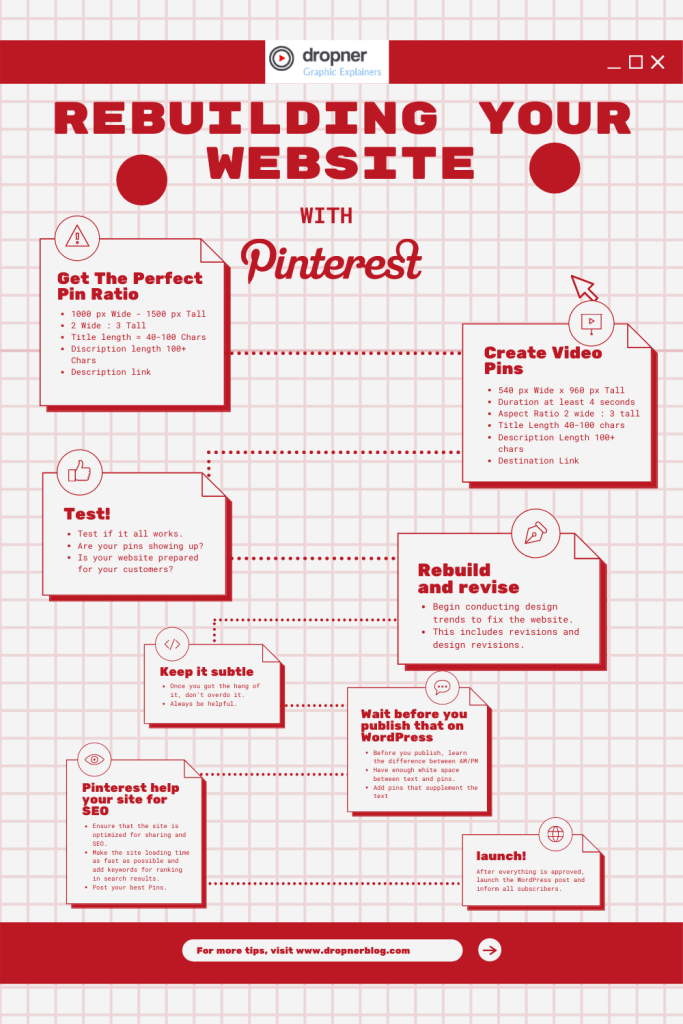
First, let’s explore some key facts about pins in my infographic.
Use these helpful Pinterest guidelines to rebuild your site with pins.
How do you add a Pinterest pin in WordPress Gutenberg?
In the video below, you’ll see a simple, step-by-step walkthrough of how to add Pinterest pins into WordPress using the Gutenberg editor.
Would you like to support this blog? You can help by making a contribution via PayPal or by following and engaging with me on my social media pages.
Did you enjoy this post?
If you agree or found it helpful, please leave a comment, like the post, or share it with your blogging friends.
Did I miss anything important?
Share your own tips or experiences in the comments so we can all learn from each other.
See more content like this by following my blog and staying updated when new blogging and Pinterest tips go live.
Thank you for reading.
Follow me on my social media channels for more digital marketing and blogging tips. If you found this useful, please give it a like and share it with your friends. Thank you \
Since 2007, Bonny Isselt has owned Dropner Blog, focusing on AI‑powered graphic design, visual storytelling, and creative content for brands around the world.
View all posts by Bonny Isselt