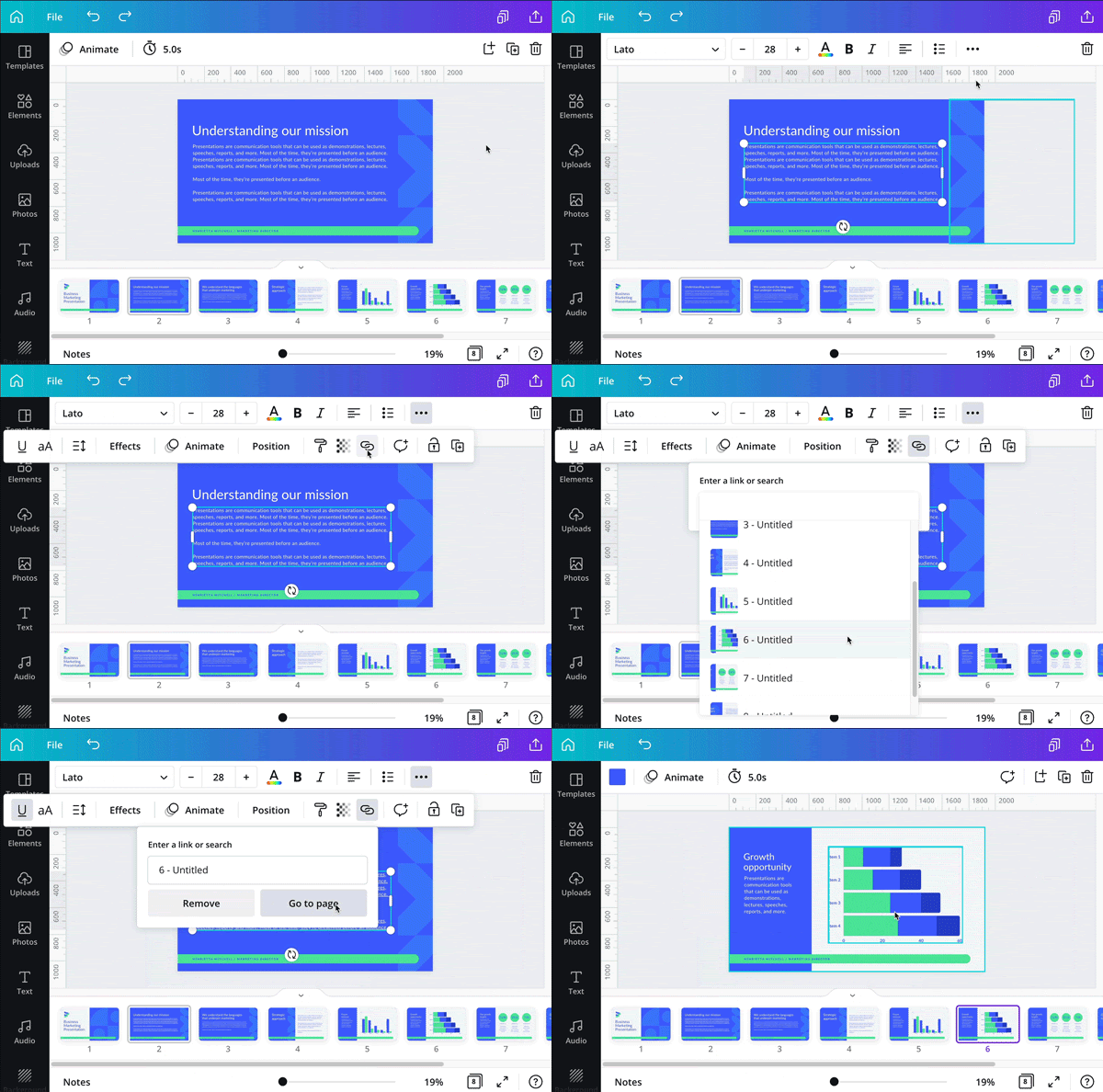
Check Out 3 Canva’s Latest Launches November 2, 2026 Canva introduces features for mobile presentations, UI prototypes, and page linking, enhancing design accessibility and interactivity.
The Branding Prompt Template for Consistent, High-Impact AI Content October 31, 2026 Branding AI prompts are reusable instructions that help maintain brand voice consistency, speed up content creation, and enhance emotional coherence.
Take Your Social Posts To The Next Level October 29, 2026 Take Your Social Posts To The Next Level
How To Create a Blog Like a Sniper? October 26, 2026 Blogging success requires precise strategies: focused keywords, clear headings, social media awareness, effective imagery, and audience targeting.
From Boring to Branded: 7 Content Tricks Bloggers Must Know October 22, 2026 Blog branding is essential for differentiation; utilizing guest posts, motivational content, and positive engagement enhances brand value and audience connection.
Defeating Evil: Embrace the Armor of God October 19, 2026 If you are into faith there is battle ahead and is not going to be a fair one. In this blog, you learn Bible-based tricks to win from evil.
6 Low Cost Ways To Market October 15, 2026 Explore budget-friendly marketing strategies for businesses, including social media engagement, logo design, and UI/UX principles.
Top Budget Hosting Providers for Bloggers October 12, 2026 Choose a suitable domain and hosting provider like HostGator to enhance your website's stability and attract traffic effectively.
Defend Your Blog Like A Ninja With 5 Patrolling Tips October 8, 2026 To succeed in blogging, identify common mistakes, analyze your audience, understand stats, and enhance content structure and visuals.
HostGator’s Gator Builder for Effective Websites October 5, 2026 To build a functional website, focus on specific customer needs, effective layout, and reliable tools like HostGator's Gator Builder.
6 Productive Habits For Bloggers October 1, 2026 Find balance in blogging with six habits: mindset, breaks, priorities, uplifting content, dressing the part, and set production hours.
6 Benefits Of Teamworking With Bloggers You Should Know September 30, 2026 Collaborating with bloggers enhances marketing efforts by boosting morale, saving money, and providing up-to-date content expertise.
Pinterest for Bloggers: Display Your Best Pins in WordPress September 29, 2026 Learning how to design and embed Pinterest pins in WordPress enhances traffic, benefiting bloggers aiming for quality audience engagement.
How To Dodge Blogging Pitfalls: 4 Tips [Short Blog] September 28, 2026 To enhance your blog, avoid pitfalls by finding your voice, adding value, and incorporating joy into your writing.
Best Tip For A Better Online Image September 24, 2026 Maintaining a positive online image is crucial; ensure your digital footprint is complete, consistent, and showcases your skills effectively.
4 Best Tips To Construct Value For Your Blog September 23, 2026 To enhance your blog's value, offer free content, maintain a portfolio, share the truth, and create original posts.
4 Tips On How To Use Social Media For Your Business September 21, 2026 Do you want know how you can use social media tools to boost your business? In this blog post you get the best 4 tips.
7 Reasons to Practice Gratitude Daily September 17, 2026 The author reflects on gratitude, recognizing its importance amid life's challenges and shares seven personal reasons for thankfulness.
How Can Instagram Be Your Online Brand September 14, 2026 Instagram is great for online branding, offering tools like Stories and DMs to engage audiences and benefit blog content.
Blog And Publish Timing | Blog Planning 3 Tips] September 10, 2026 Taking breaks in blogging is key; plan your blog, publish, and research hours for balance and better content.
Team Up With Bloggers And Content Marketers September 7, 2026 Team collaboration enhances content creation, boosts brand visibility, and drives traffic, making blogging essential for business growth.
5 Best Ways To Collaborate And Work Online That Boost Your Productivity September 3, 2026 Struggling with content creation? Try podcasts, guest blogging, teamwork, and effective emails to boost your creativity and productivity!
5 Questions to Ask When You Need a Visual Fast and There’s No Designer on Call September 1, 2026 Creating quick visuals can be tough, but breaking it down into purpose, references, and finish levels saves time and stress.
4 Writing techniques that a blogger must have August 31, 2026 Blogging requires mastering copywriting, content writing, explaining, and editing techniques to avoid outdated practices and improve reader engagement.
5 Effective Leadership Tricks For The Entrepreneur August 24, 2026 Effective leadership involves guiding others, prioritizing consumer needs, protecting data, and developing skills for personal and professional growth.
Be A Hero Of Faith August 21, 2026 To become a faith hero, one must understand faith, trust in God, acknowledge His lordship, and appreciate life’s blessings.
Being Smart Through Faith August 19, 2026 Mental meltdowns hinder creativity, but faith in Jesus Christ renews the mind, offering wisdom and insights through the Holy Spirit.
How To Overcome A Blog Meltdown [Blog-Mindset] August 17, 2026 Blog meltdowns can be overcome with insights, learning, skill development, guidance, organization, bookmarking, and taking breaks.
How To Score 100 With Rank Math SEO | Best SEO Tutorial August 14, 2026 Rank Math is an essential WordPress SEO plugin that enhances content optimization, tracks scores, and improves visibility easily.
Laboratory Ovens: A Complete Buying Guide for Labs August 13, 2026 Choosing the right lab oven matters for consistent results; prioritize specs, safety, and support to avoid costly mistakes.