
Written By Bonny Isselt.
Introduction to starting a WordPress blog tips for beginners
Managing and starting a WordPress blog is deceptively simple, but it requires passion and dedication to leave a lasting impact. The good news is that WordPress provides an inviting platform to ease your entry into this exciting journey.
But, the thrill lies in crafting a profound and influential beginning that resonates with your audience.
You don’t have to be a genius to start a WordPress blog. It’s just a matter of challenging yourself and improving.
A WordPress blog is a website managed using the WordPress platform. It covers various topics and includes features like comments, categories, tags, and multimedia elements. Additionally, many plugins can add depth to your blog.
Key Takeaways
- Domain names are short and relevant to your niche.
- Before you buy, check if the domain name is free.
- HostGator, Bluehost, and Siteground offer excellent and affordable WordPress plans.
- Install WordPress SEO plugins —>> only 1, not 3 (Rank Math, Yoast, All in One SEO) and SEO themes.
- For E-commerce install WooCommerce.
- Install an image compressor —>> only 1 (Imagify, TinyPNG, Smush, ShortPixel).
- Do not overdo it with plugins they conflict and compete with each other, resulting in slow speed and bad performance.
- Write quality and rich content (images, videos, or infographics) including external and internal linking.
- Promote your content with free and paid options.
- Create a community of followers and grow it.
- Repeat and remove mistakes.
Importance of starting a WordPress blog
Launching a WordPress blog is crucial for creativity, knowledge sharing, and community building.
It provides a platform for establishing an online presence. It helps in connecting with a global audience. It aids in monetizing content. It leverages valuable content through engaging blog posts. This makes it easy to set up in no time.
The best part is that your blog looks professional, even if you’re a beginner.
This facilitates communication, self-expression, and digital marketing in our interconnected world.
Tip 1. Choosing a Domain name
A good domain name should clarify what you’re all about and be easy for your readers to remember.
When choosing a domain name for your WordPress blog, consider the following tips to ensure it is memorable and relevant to your content:
- Clarity and Relevance: Opt for a domain name that clearly reflects the content or focus of your blog. Incorporating keywords related to your niche can enhance the relevance of the domain name.
- Memorability: Aim for a domain name that is easy to remember and pronounce. Avoid complex or obscure words that are difficult for your audience to recall.
- Length: Keep the domain name concise and avoid unnecessary words or characters. Shorter domain names are often easier to remember and type.
- Avoid Numbers and Hyphens: Steer clear of using numbers and hyphens in your domain name. These elements can cause confusion. They can also make the name less memorable.
- Trademark Considerations: Ensure the domain name does not infringe on existing trademarks or copyrights. Conduct a thorough check to avoid legal issues in the future.
- Future Expansion: Consider the potential for future growth and expansion of your blog’s content. Choose a domain name that can accommodate the potential diversification of topics or offerings.
- Check Availability: After brainstorming potential domain names, verify their availability using a domain registrar or hosting provider. It’s essential to secure a domain name that is not already in use.
What are good domain names?
These are short and show relevance and are memorable.
Examples of good domain names.
- journelo.com
- penloft.com
- blogletta.com
- scribblit.com
- wordrush.com
What is a bad domain name?
They are too long, confusing, not easy to remember, and too broad. So you don’t know what it’s about.
Examples of bad domain names.
- bloggerificiousity.com
- scribbleverseblog.net
- wordywordsmithinghub.com
- blogtopiaworld.org
- writeomaticsphere.biz
Steps to check domain availability
Before starting a WordPress blog, be sure to register a domain and ensure it is available.
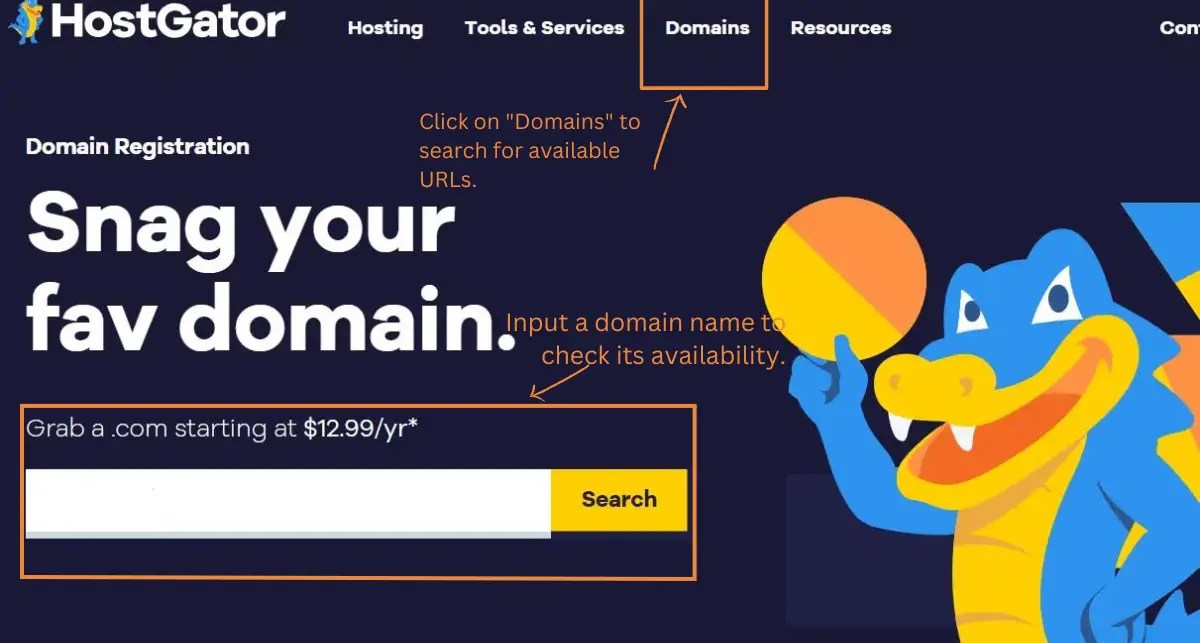
Most hosting platforms offer ways to check if the domain is available or not. What we recommend is using the registrar of HostGator. The reason is that it’s easy, and fast, and you can search and buy it or reject it.
Go to ***HostGator —>> Click on domains —>> Enter the domain (yourwebsitename.com) —>> Click search —>> Done.
You get a list of TLDs, with the best ones at the top and the not-so-great ones further down.
By following these tips, you can pick a domain name that really connects with your audience. It captures the essence of your WordPress blog.
Tip 2. Setting up Web Hosting
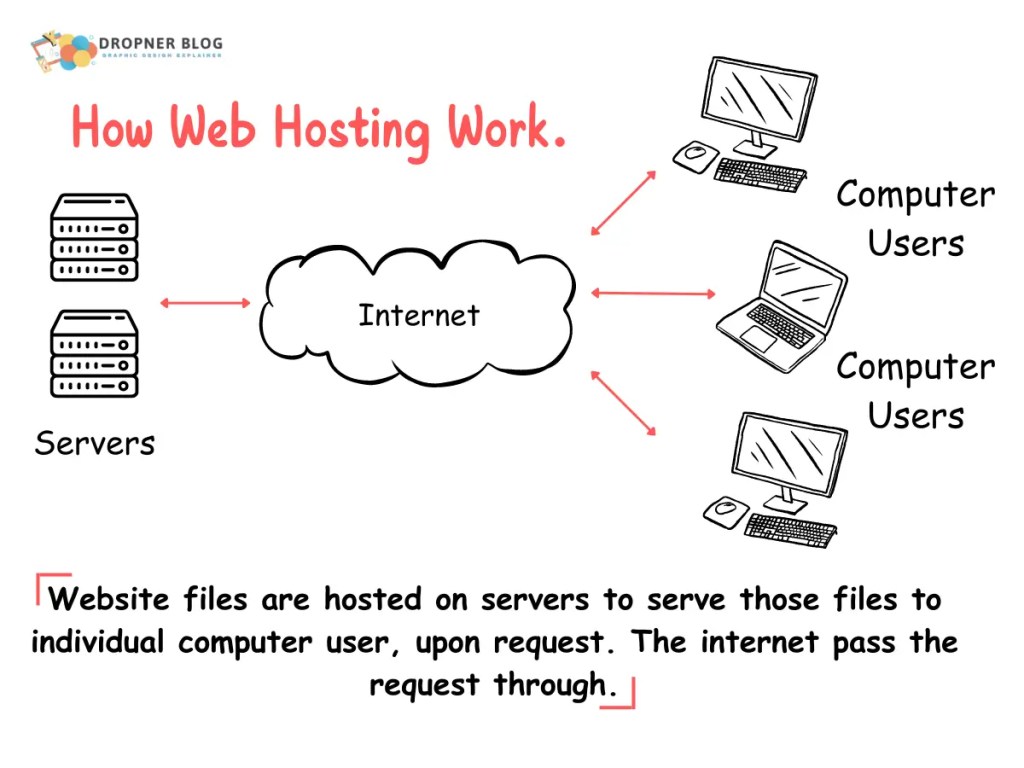
Web hosting is a service that allows individuals and organizations to make their websites accessible. This is done via the World Wide Web.
It involves storing the website’s files and data on a specialized computer called a server. This server is connected to the internet.
When a user types in the website’s domain name, the internet connects to the server. The web pages are delivered to the user’s device through the web browser.
Essentially, web hosting provides the technology and infrastructure needed to make a website visible and accessible online.
I made this picture to illustrate this.
An example of a web hosting service is Bluehost. Bluehost offers various hosting plans suitable for different website needs, including shared hosting, VPS hosting, dedicated hosting, and WordPress hosting.
They also offer domain registration services, tools for website building and management, and reliable customer support.
Best WordPress Hosting Providers Compared: Bluehost vs HostGator vs SiteGround
Starting a WordPress blog you must choose a web hosting service. You also need to assess your specific performance needs.
Also, evaluate the support and pricing. This evaluation will help you make an informed decision that aligns with your blogging goals.
When selecting a web hosting service for your WordPress blog, it’s crucial to consider several factors.
These factors include performance, support, pricing, and extra features. Here’s a comparison of three popular web hosting services:
| Category | Bluehost | HostGator | SiteGround |
|---|---|---|---|
| Performance & Reliability | Strong performance with fast loading times and reliable uptime. Fully optimized for WordPress, ensuring smooth operation. | Stable performance and reliable uptime, capable of handling WordPress sites of various sizes. | Exceptional performance with fast loading times and highly optimized WordPress infrastructure. |
| Customer Support | 24/7 support via phone, live chat, and email. Knowledgeable team for WordPress‑related issues. | 24/7 support through live chat and phone. Equipped to assist with WordPress and technical questions. | 24/7 support with a strong focus on WordPress assistance and quick technical resolutions. |
| Pricing | Competitive and beginner‑friendly shared hosting plans. Offers specialized WordPress hosting. | Affordable hosting plans with ample resources for WordPress. Domain registration available. | Competitively priced, feature‑rich WordPress hosting with additional performance optimizations. |
| Extra Features | User‑friendly control panel, free SSL certificate, one‑click WordPress installation, and various site‑building tools. | Easy‑to‑use control panel, free website builder, one‑click WordPress installation, and scalable add‑on services. | Free website migration, advanced caching, enhanced security features, and strong performance tools. |
Installing WordPress
Once you get a web host that syncs with your blog idea, then it is time to install WordPress. Starting a WordPress blog can be easy. You still have to think twice. Blogging is a long and lonely road.
If you are not ready for it, do some research on your own to make an informed decision.
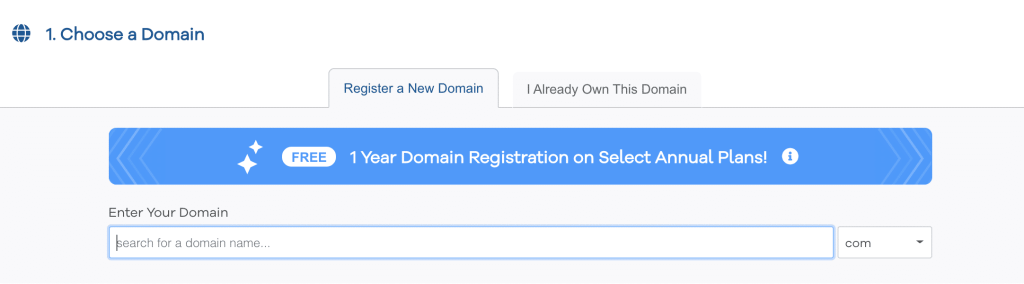
Starting a WordPress blog begins with choosing a domain take your time before you buy one don’t rush yourself.
Step 1. Make your buy on a domain name
Step 2. Enter your billing info
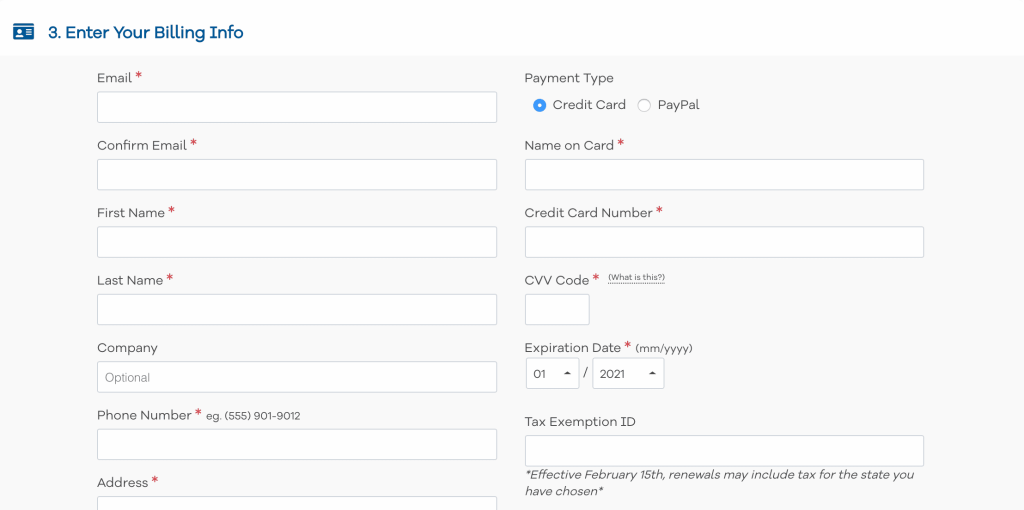
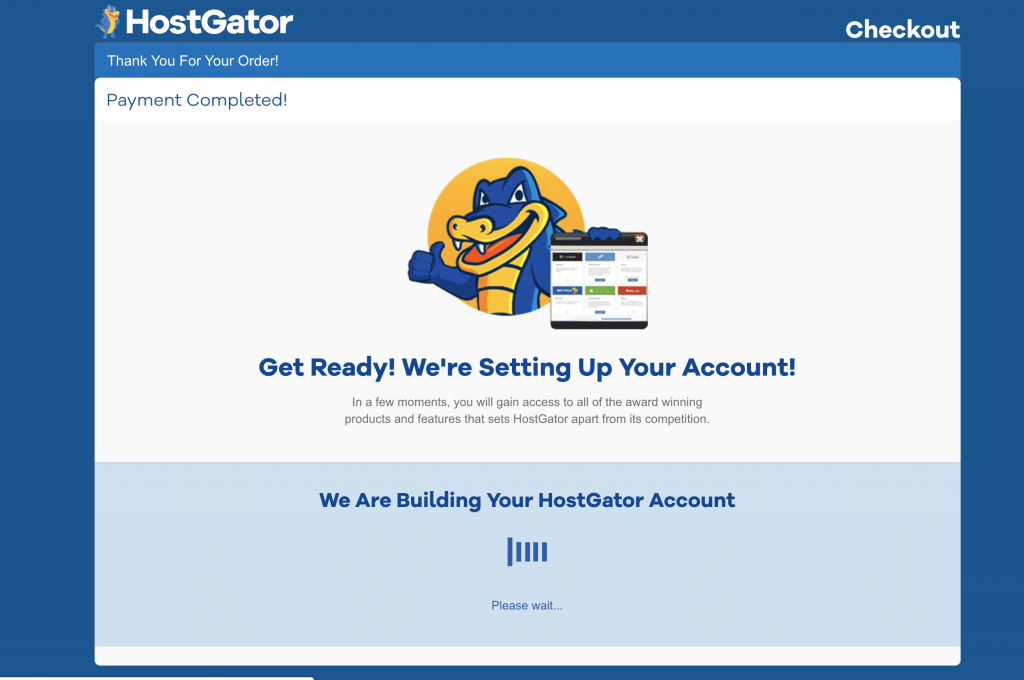
Payment finished
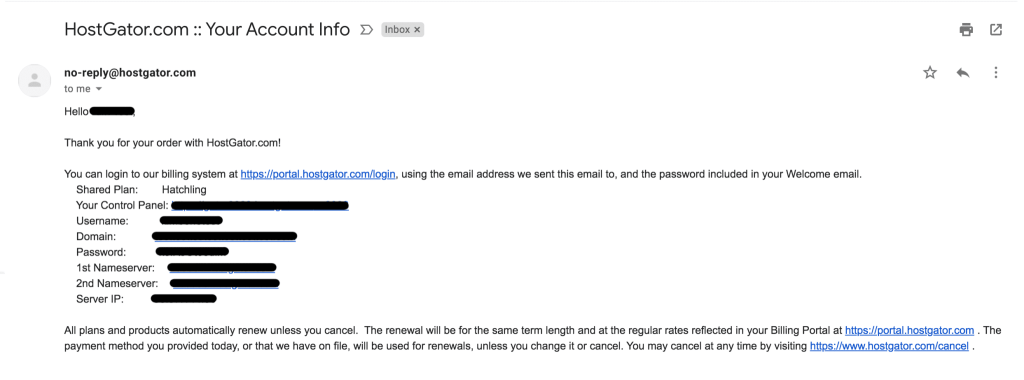
Step 3. HostGator Dashboard Access Email
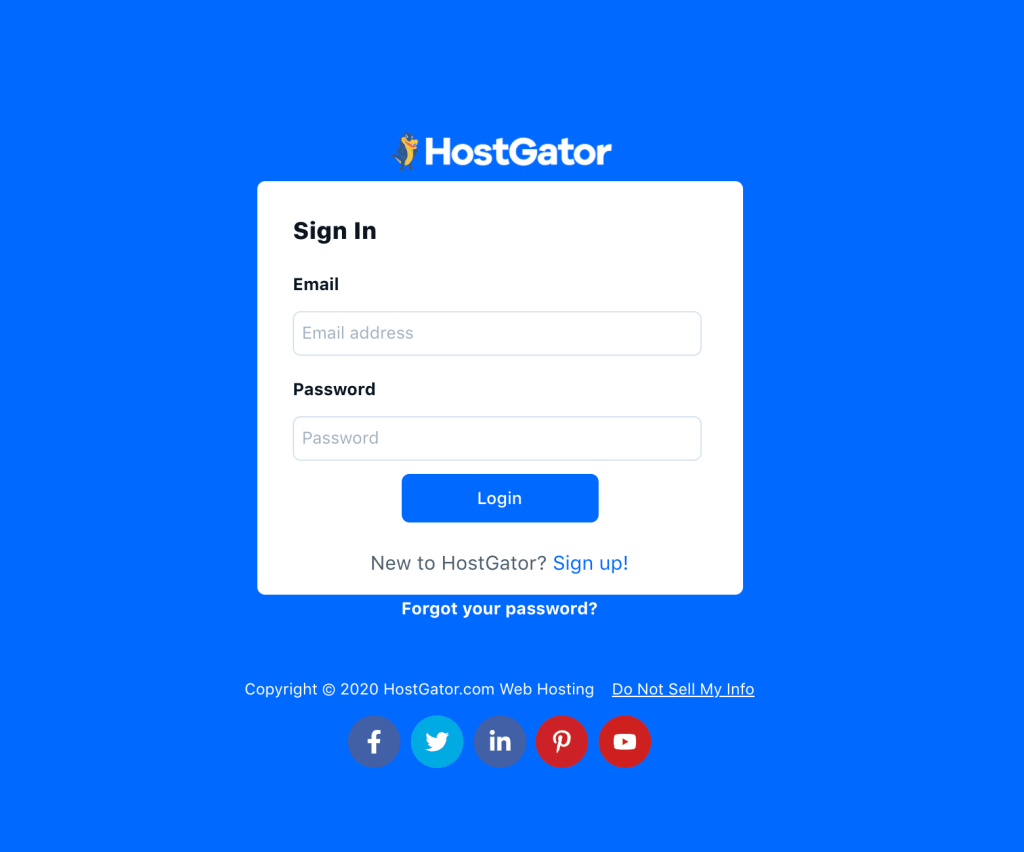
Step 4. Go to your HostGator Cpanel
Step 5. Instal WordPress
Click on the WordPress installer to install WordPress.
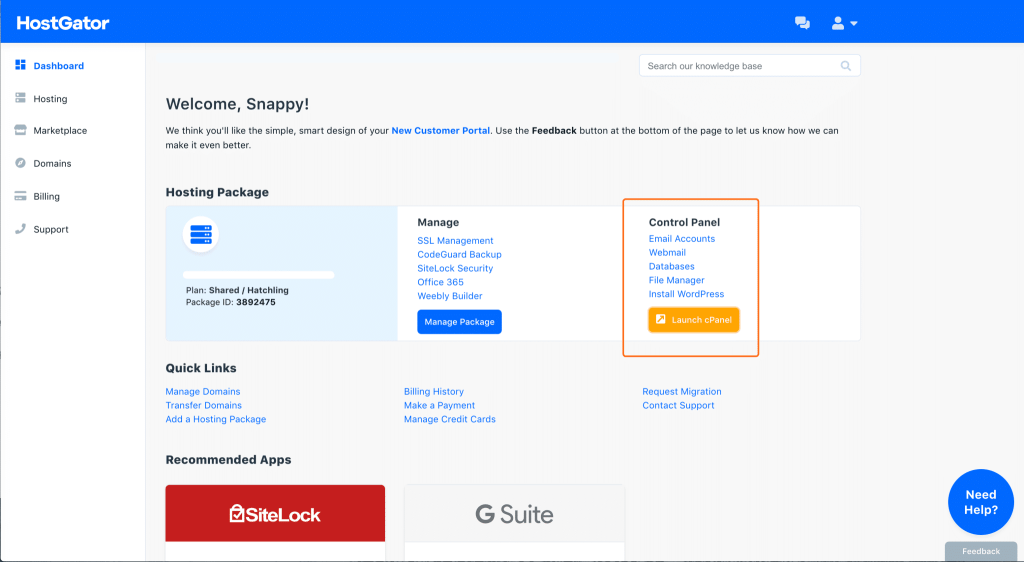
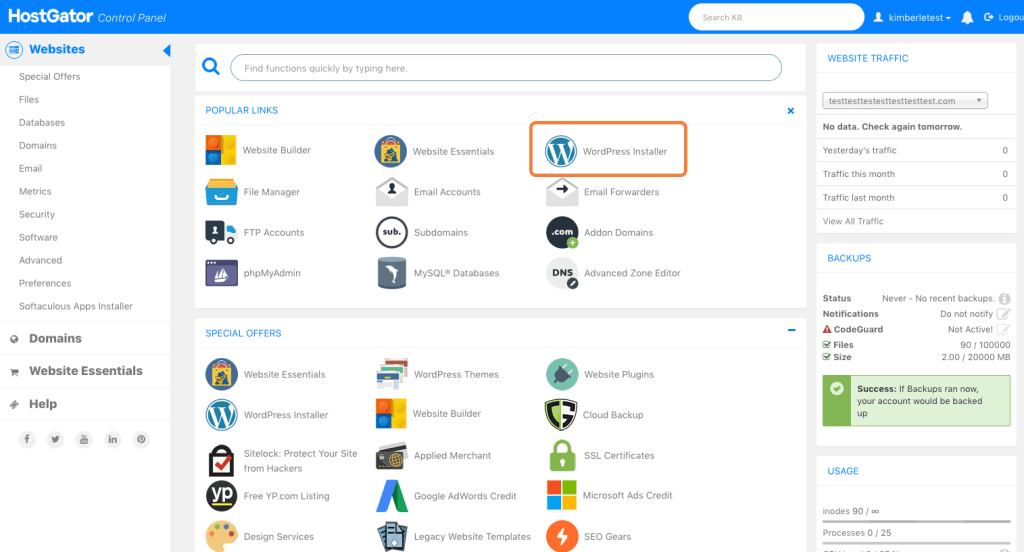
Step 6. Wait for it to finish the progress
Let the installation continue without interruption. Just wait and avoid any other actions.
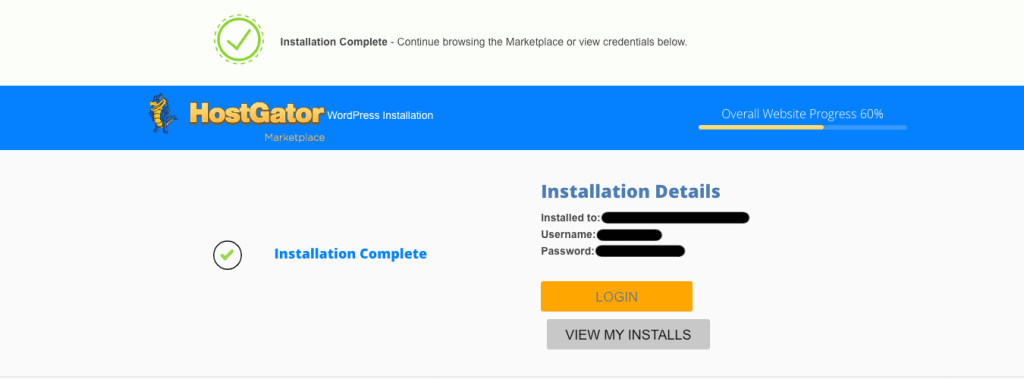
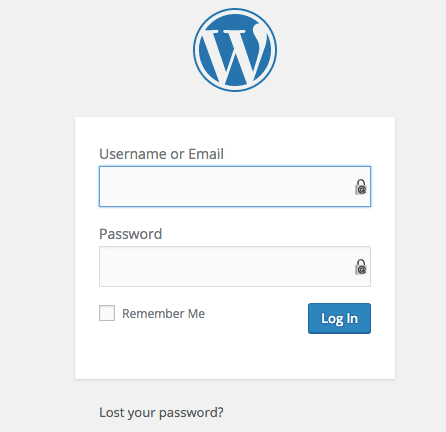
Step 7. Log in to your WordPress dashboard
Log in with the installation details of HostGator on WordPress.
Adjust the basic WordPress settings
Go to the settings tab and choose permalinks.
From an SEO standpoint chance the permalink to rank higher.
Go for:✅/%category%/%postname%/ this means ✅ https://www.yourdomain.com/category/postname/Let's change this into a possible live link.✅ https://www.dropnerblog.com/blog/start-a-seo-blog/
This link structure is SEO-friendly, so it’s wise to carefully consider if your links are ready for future use.
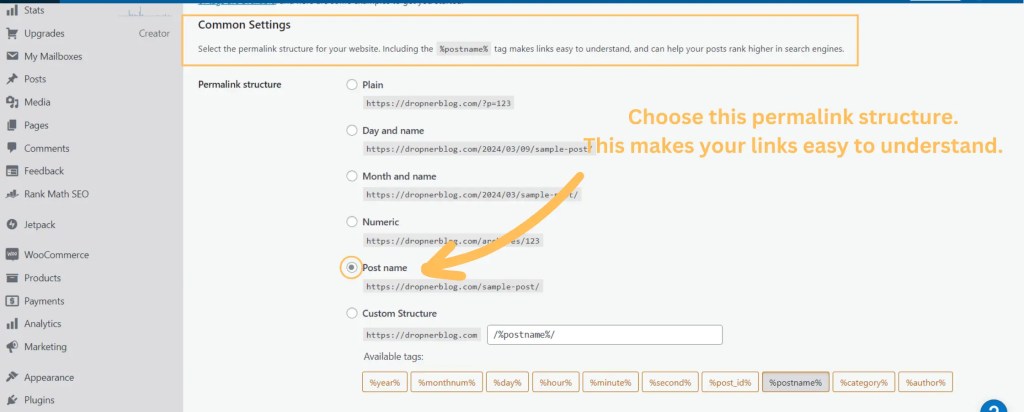
Discover how to make SEO-friendly links with the help of the Rank Math SEO WordPress plugin.

Beginner’s Guide to WordPress Blogging
Starting a blog with WordPress can be a rewarding journey. This guide will help you navigate through the essential steps to set up and maintain your blog successfully.
Selecting and Customizing a Theme
- Importance of Choosing the Right Theme: A well-designed theme enhances user experience and reflects your blog’s personality.
- Tips for Narrowing Down Choices:
- Browse through WordPress’s directory or third-party marketplaces.
- Check compatibility with essential plugins and ensure it’s responsive.
- Customization Options: Modify your theme’s appearance through the WordPress Customizer to fit your brand.
Essential Plugins for a Blog
Many WordPress workers and bloggers say that you should have no more then 20 plugins because it can slowdown your site.
- Overview of Plugin Options: With over 58,000+ plugins available, choose wisely to avoid bloating your site.
- Recommended Plugins:
- Rank Math SEO: Optimize your content for search engines.
- Imagify: Improve site speed by compressing images.
- WooCommerce: Set up an online store if needed.
- Jetpack: Enhance functionality and security.
- Akismet: Protect against spam comments.
- Gutenberg: Use the block editor for seamless content creation.
- Getwid: Access additional blocks for customization.
- Research Plugins:
- Utilize resources to find must-have WordPress plugins for your specific needs.
Creating Engaging Content
- Tips for High-Quality Posts:
- Write compelling headlines and include visuals.
- Provide value and insights that resonate with your audience.
- Importance of SEO: Use keywords, meta descriptions, and alt text for images to improve visibility in search engines.
Promoting the Blog
- Strategies for Promotion:
- Share your posts on social media platforms.
- Engage in online communities and forums related to your niche.
- Utilize Email Marketing: Build a subscriber list and send newsletters to keep your audience informed and engaged.
Engaging with the Community
- Building a Community: Encourage comments and discussions on your blog posts.
- Interacting with Readers: Respond to comments and reach out to other bloggers for collaboration opportunities.
Monetization Options
- Introduction to Monetizing: Explore different avenues to earn through blogging, such as affiliate marketing, sponsored posts, and advertising.
- Different Methods for Earning: Consider options like freelance writing or creating online courses alongside your blog.
Conclusion
Starting a successful WordPress blog involves careful planning and consistent effort. Take the time to learn, adapt, and engage with your audience. Remember, every seasoned blogger was once a beginner —keep pushing forward!

 Dropner Graphic Explainer
Thanks for putting this together. The section on starting wordpress blog hostgator added a useful perspective. A related resource for dijital pazarlama ajansı is https://cythradigital.com/.